Feature Size
Legacy mode tools analyze images based on the Feature Size parameter that you specify. The feature size The subjective size of the image features that you feel are most important for analyzing image content. The feature size determines the size of the image region used for sampling. Only used with Blue Locate, Blue Read, and Legacy type tools., which is based in pixels, functions as a hint to the tool about the expected size of "meaningful" or "distinctive" features in the input images. The best method for selecting a feature A feature is a visually distinguishable area in an image. Features typically represent something of interest for the application (a defect, an object, a particular component of an object). size is to examine the input images as if you were a human inspector. Note the features in the image that you would use to characterize the image as good or bad, to identify a defect or problem, or to determine where something was and what it was.
For example, if you were attempting to classify pictures of airplanes based on the number of engines, the feature size would be based on the approximate size of an airplane engine.
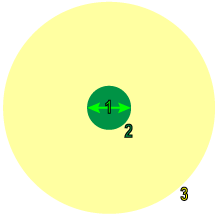
During both training Training is the process that your tool, which is a neural network, is learning about the features (pixels) based on the labels you made. For example, a tool will learn the defect/normal pixels in each image based on the defect/normal labels you drew. The goal of the tool Training is learning enough to give the correct inspection results of whether an unseen image is defective or not. The key to training is to ensure that you include all possible variations within your training set, and that your images are accurately labeled. Training times vary by the application, tool setup and the GPU in the PC being used to train the network. and runtime, the tool collects samples from the image that correspond to the pixels within a subregion of the image, as well as contextual information around that region. The contextual region is approximately five times the feature size. For more information, see Feature Sampling.
|
|
|
|
|
1 |
Feature Size |
|
|
2 |
Sample Region |
|
|
3 |
Context Region |
|
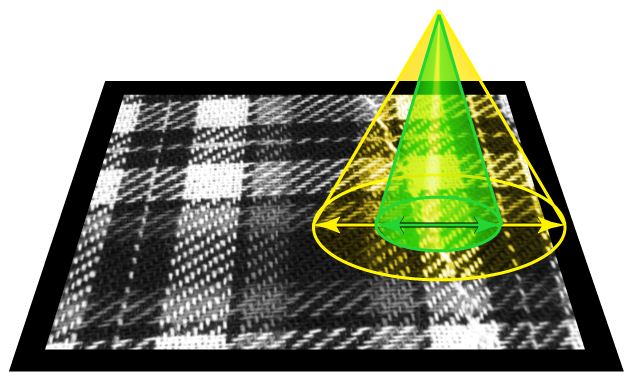
Feature Size Optimization
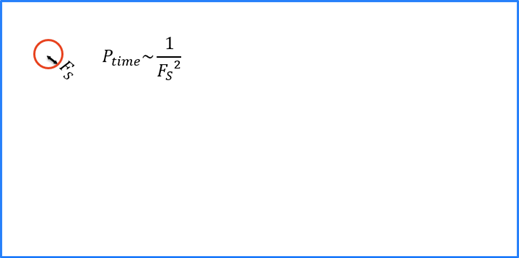
Feature size strongly influences processing time (n2 ), and to a lesser extent, the time required to train a tool. A feature size of 100 is 100 times faster than a size of 10, while a feature size less than 15 usually does not yield good results. A larger feature size is much quicker to process, but larger feature sizes cannot "see" or "respond to" small features.
For both training and runtime, each tool collects image samples that completely cover the extent of the image.
During training, the tool samples the entire extent of the input image, and it oversamples regions that it determines contain more information.