Loss Inspector
You can use the Loss Inspector to monitor how validation loss changes when training High Detail mode tools. By monitoring the validation loss, you can check the following characteristics:
-
The fluctuation and the saturation of the validation loss to get the best loss for the best model.
-
How good is the model at generalization
-
How much the model is overfitted as this loss is from the validation set.
For more information about validation loss, see Validation Loss.
|
|
|
|---|---|
| Status Variable | Description |
| Elapsed Time | The elapsed time for the current training. |
|
Elapsed Epoch |
The elapsed epoch for the current training. |
|
Loss |
The validation loss of the trained model at a certain time. Loss is calculated in every 0.125 epoch. |
| Best Epoch | The epoch that recorded the lowest loss among all the elapsed epochs. |
| Best Loss | The lowest loss among all the elapsed epochs. |
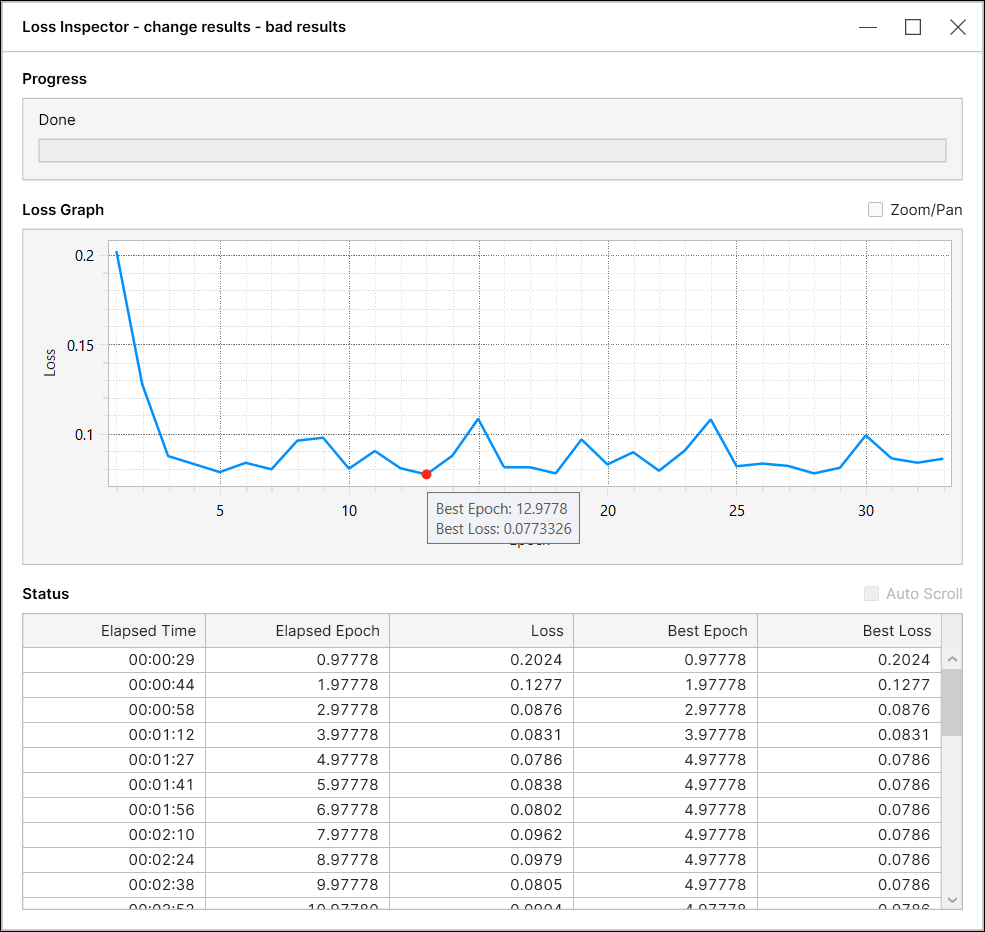
When the Loss remains the same over several Elapsed Epochs, the loss inspector uses an internal metric to select the Best Epoch from the epochs with the same Loss value. The metric selects an epoch to provide the best results. In the example below, the internal metric selects 5 as the Best Epoch among 3, 4, and 5.
| Elapsed Epoch | Loss | Best Epoch |
| 3 | 0.2 | 3 |
| 4 | 0.2 | 3 |
| 5 | 0.2 | 5 |
| 6 | 0.2 | 5 |
| 7 | 0.2 | 7 |
For more information about using the Loss Inspector, see Using the Loss Inspector.