The 3D-A5000 sensor supports a set of custom properties that control acquisition parameters such as an exposure time, a region of interest, and more. For many new 3D applications, Cognex recommends you use the A5000 Viewer to determine and set which acquisition parameters work best for your 3D-A5000 sensor. See the topic The A5000 Viewer for full descriptions of the custom properties and how to use the A5000 Viewer to modify them.
In addition to the Viewer, VisionPro supports other methods for modifying custom properties:
The AcqFifoTool Edit Control in QuickBuild supports a Custom Properties tab to set the values interactively, as shown:
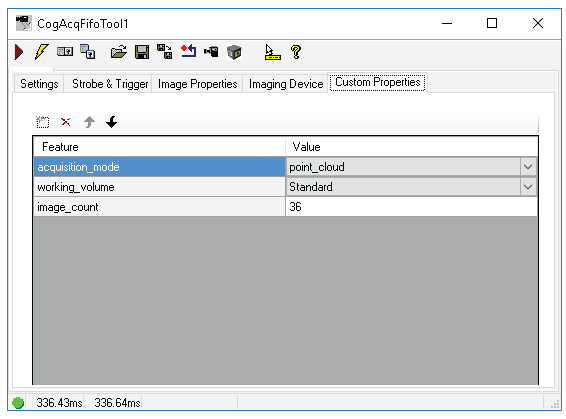
The following table lists all the custom properties you can access through the CogAcqCustomProperty programmatic interface.
| Custom Property | Values |
| acquisition_mode | point_cloud point_cloud_with_grey point_cloud_with_range range_image range_image_with_grey grey_image_primary grey_image_secondary |
| binning | Enabled with the string "on" |
| camera_1_offset_x camera_2_offset_x | Between 0 and (1440 - width) |
| camera_1_offset_y camera_2_offset_y | Between 0 and (1080 - height) |
| compression | None Low |
| firmware_version | Read-only value |
| hdr_high_exposure | Between 10 - 5000 (microseconds) |
| hdr_high_exposure_enable | Enabled with the string "on" |
| hdr_low_exposure | Between 10 - 5000 (microseconds) |
| hdr_low_exposure_enable | Enabled with the string "on" |
| height | Between 0 - 1080 (pixels) |
| image_count | Between 12 - 60 (images) |
| outlier_filtering | Disabled Permissive Balanced Strict |
| pre_filtering | Between 0 - 9 |
| reconstruction_quality | Between 0 - 9 |
| score_threshold | Between 0 - 1.0 |
| volume_of_interest_enable | Enabled with the string "on" |
| volume_of_interest_max_x volume_of_interest_max_y volume_of_interest_max_z volume_of_interest_min_x volume_of_interest_min_y volume_of_interest_min_z | No defined range. Cognex recommends you use the A5000 Viewer to visualize the best volume of interest. |
| width | Between 0 - 1440 (pixels) |
| working_volume | Extended Standard |
The following code sample shows how to set and save a custom property programatically:
CogFrameGrabberImagingDevices fgs = new CogFrameGrabberImagingDevices();

// the pixel format is ignored here
ICogAcqFifo fifo = fgs[0].CreateAcqFifo("Cognex NullFormat", CogAcqFifoPixelFormatConstants.Format8Grey, 0, true);
fifo.OwnedExposureParams.Exposure = 0.11;
fifo.TimeoutEnabled = false;

// Create a new custom property instance for acquisition_mode
var customProperty = new CogAcqCustomProperty("acquisition_mode", "point_cloud_with_range", CogCustomPropertyTypeConstants.TypeEnum);

// Take the current list of custom properties out of the fifo
List<CogAcqCustomProperty> customProps = fifo.OwnedCustomPropertiesParams.CustomProps;

// Add the new custom property to the list
customProps.Add(customProperty);

// Assign the new custom property list back to fifo and acquire a point cloud with range image
fifo.OwnedCustomPropertiesParams.CustomProps = customProps;
CogAcqInfo info = new CogAcqInfo();
ICogVisionData visionData;
var ticket = fifo.StartAcquire();
info.RequestedTicket = ticket;
visionData = fifo.CompleteAcquireVisionDataEx(info);