Your vision application must ensure the VisionPro software is properly authorized for use through a USB security key or a CFG-8700 series frame grabber.
Your Cognex sales representative can provide a USB security key programmed with the desired licenses for your vision application. Attach the key to your computer before you launch any VisionPro application. The topic VisionPro Licenses lists all the VisionPro licenses required by specific vision tools.
See the following sections for more information:
As your application runs, the Cognex Security Service verifies the presence of the key and the licenses for the vision tools that you want to use:

You can plug the key into a USB hub that is connected to multiple computers, but only one computer can use the key at any time. You cannot share the license information on a security key with multiple computers.
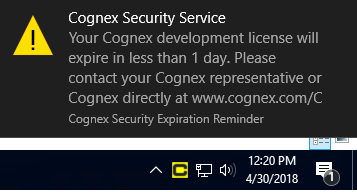
The Cognex Security Service includes a Windows scheduled task that runs on your computer every day and notifies you if any licenses on your security key will expire within the next 30 days. The task displays a balloon alert and notification in the system tray:
At startup, QuickBuild displays a security reminder for security keys that have expired or about to expire:
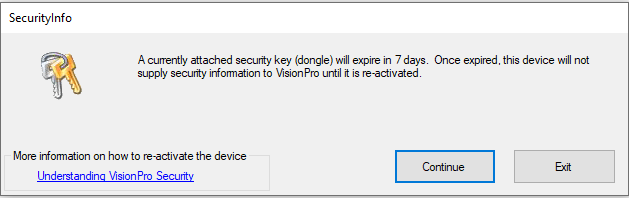
- The reminder indicates if the key has expired or the number of days remaining on the key.
- The reminder does not appear if the key has no expiration or if the expiration date is more than 60 days away.
- The reminder does not appear if VisionPro fails to detect a security key.