The VisionPro GenTL acquisition module enables VisionPro applications to acquire images directly through cameras (or a combination of cameras and frame grabbers) that follow the GenICam Standard. GenTL technology allows VisionPro to connect to a variety of cameras via a Generic Transport Layer. This layer is provided by camera manufacturers via a GenTL producer file. VisionPro software is known as the GenTL consumer. This VisionPro release supports only the following transport layers and producers:
| Company Name | Transport Layer Type | Producer File Name | Camera Models |
| Basler AG | U3V (aka USB3) | ProducerU3V.cti | All Basler U3V camera models |
| Cognex Corporation | CoaXPress (CXP-12) | MVProducerCXP.cti | All Cognex CXP-12 camera models |
VisionPro does not support other transport layers and other manufacturers.
This topic contains the following sections.
- Acquisition Architecture
- Basler GenTL Producer for Basler U3V Cameras
- USB3 Hardware Requirements
- A Brief Overview of GenICam and GenTL
In addition, your VisionPro installation includes a sample Visual Studio solution for GenTL acquisition located in %VPRO_ROOT%\samples\Programming\Acquisition\GenTL\USB3\Basler\C#\GenTLUSB3Basler.
VisionPro image acquisition is based on a modular architecture, with separate acquisition modules for each type of supported image acquisition device. Your VisionPro installation comes with a module for each type of Cognex frame grabber, a module for GigE Vision cameras, a module for third-party imaging devices, and a module for GenTL devices.
The following figure represents an overview of VisionPro acquisition system modularity:
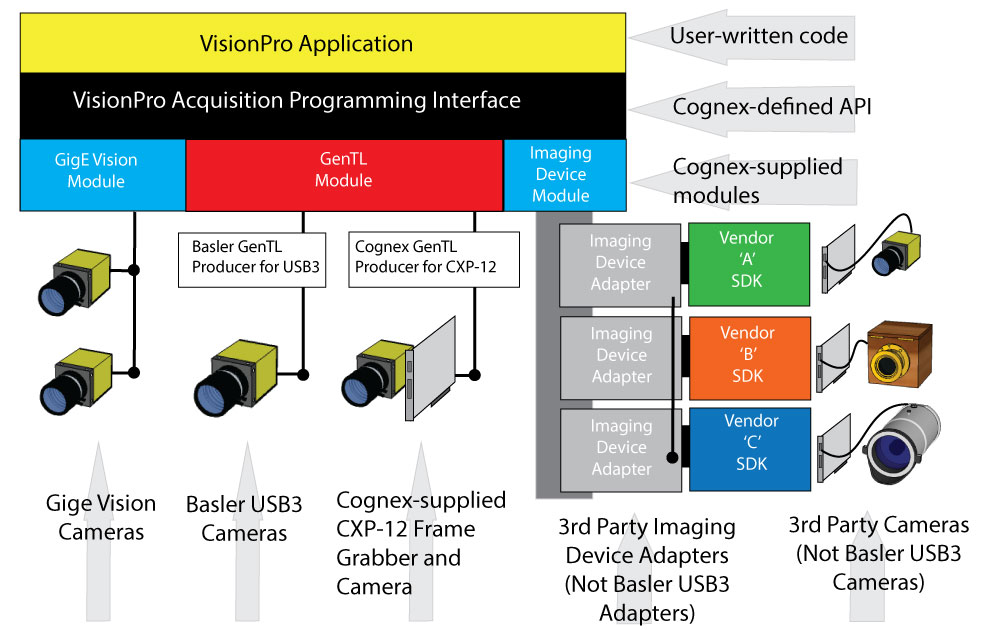
Previous VisionPro releases supported all USB3 cameras through the Imaging Device Module using a 3rd party AIK adapter. Beginning with VisionPro 9.10, Basler USB3 cameras no longer require the Basler AIK.
Note: When using Basler USB3 cameras via GenTL you should not install the Basler AIK.
The VisionPro installer includes the Basler GenTL producer automatically. The installed Basler producer comes from Basler's Pylon Runtime, version 7.5.0. Normally this Pylon runtime is installed in C:\Program Files\Basler\pylon 7, but if you already have a pre-existing installation of Pylon 6 the 7.5.0 producer file will be placed in the existing C:\Program Files\Basler\pylon 6\Runtime\x64\ directory.
To acquire images from a USB3 camera you need all the following hardware:
- USB3 camera(s)
- USB3 cable(s)
- USB3 port(s) on your PC that can supply sufficient power for your cameras
- A security key
This section contains the following subsections.
It is important that you only use USB ports that are rated for USB3 communication. If you plug your camera into an older USB or USB2 port the camera may be listed as being available for use by VisionPro, but it will not work properly. You must also ensure that your USB3 port(s) can provide enough combined power to adequately supply all of your USB3 devices. For multi-camera applications with high power requirements you may need to purchase a multi-port adapter card with its own power connector. For example: https://www.baslerweb.com/en/products/vision-components/pc-cards/usb-3-0-interface-card-pcie-fresco-fl1100-4hc-x4-4ports/.
For situations which require long cables in an electrically noisy environment, consider a hybrid USB3 cable, like this one: https://www.baslerweb.com/en/products/vision-components/cable/cable-usb-3-0-hybrid-micro-b-sl-a-10-m/.
Your PC must include one of the following security mechanisms to run Cognex software:
- A Cognex CGF-8734 or MVS-8804 frame grabber
- A Cognex security key (dongle)
Either of these devices can provide your Cognex software with required license information. See your Cognex sales representative for details.
The Cognex Drivers Installer offers the option to install the Cognex GenTL producer and its supporting runtime for CXP-12. The installer copies the files, by default, to the directory C:\Program Files\Cognex\Common\MV Viewer\RunTime\x64\. VisionPro requires the producer and its supporting runtime to acquire images with the following Cognex CXP-12 frame grabber and cameras:
- Cognex GenTL CIC area-scan camera(s), for example CIC-A12-MG-330-Y
- CFG-CPC38-YHB-4P frame grabber (1 per camera) installed in Gen 3 PCIe x8 or x16 slot
- CCB-CXP-HB-5F-HB CXP-12 data cable (4 per camera)
CCB-IO-HR12F-5 or CCB-IO-HR12F-10F I/O cable (1 per camera)
Optional if not triggering the camera by external means
LNS-ADAPT-M58-F, M58 to F-Mount Lens Adapter (1 per camera)
If using F mount lenses
Before you use VisionPro software to acquire images from GenTL cameras, you should know a few basic facts. The Generic Transport Layer is a sub-part of the Generic Interface for Cameras Standard, known as GenICam. The key parts of the GenICam standard are:
- GenApi: This standard describes how camera manufacturers can provide a generic XML description of the features (i.e. properties) of a camera. Users can read and write values to these features programmatically to control the camera.
- SFNC: The Standard Feature Naming Convention describes the exact name, and expected behavior, of common camera features. Some of these features are specified as mandatory, and must be present on all GenICam cameras.
- GenTL: This standard defines a Generic Transport Layer that allows users to enumerate and access attached devices (i.e. cameras) regardless of how they are physically attached. For example, users can acquire images from a USB3 camera and/or a CoaXPress camera using generic software. GenTL introduces additional XML descriptions for the features that allow users to enumerate and access GenTL devices.
- GenTL SFNC: This standard describes the exact name and behavior of the extra features that are provided by GenTL. Notice that these are not the features of the camera itself. Those are described in the regular GenICam SFNC. The features in the GenTL SFNC are only the features that control the Transport Layer.
The extra features provided by the GenTL standard are organized into a hierarchy of feature sets, as shown in this diagram:
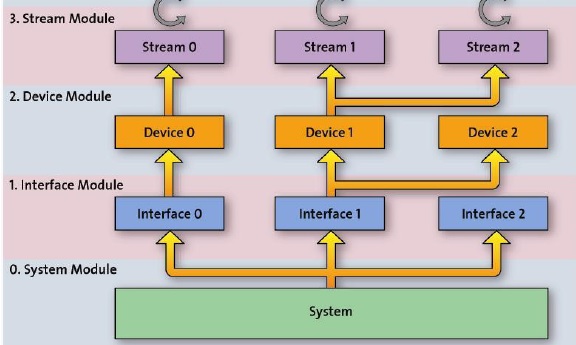
- The System level is the root of the hierarchy, and allows users to enumerate the available interfaces of the system.
- The Interface level corresponds to a single physical interface (like a network interface card or frame grabber). It must represent only a single transport layer technology and allow users to enumerate all the available devices that are attached using that technology.
The Device level represents one physical device (such as a camera) that can return image data. The Device level is logically split into two sub-parts:
- The Local Port presents the features that are specific to GenTL. These control the transport layer.
- The Remote Device presents the GenICam features that are specific to the attached camera model.
- The Data Stream level represents the image data flowing from the camera.
Each of these hierarchical levels can be controlled through a set of XML features. To help you understand and remember these feature sets VisionPro software uses a system of two-letter prefixes:
- XML features that control the System level of GenTL are prefixed with SY_.
- XML features that control the Interface level of GenTL are prefixed with IF_.
- XML features that control the Device level of GenTL are prefixed with LP_. This prefix stands for "Local Port".
- XML features that control the camera itself are prefixed with RD_. This prefix stands for "Remote Device". All of the RD_features are part of the GenICam SFNC standard and are not part of the GenTL SFNC. The RD_ features are in the camera, not the transport layer.
- XML features that control the Data Stream level of GenTL are prefixed with DS_.
For example, if you want to read the current value of the BalanceWhiteAuto feature from your USB3 camera, you should read the RD_BalanceWhiteAuto feature in VisionPro.