Finding Lines with the SmartLine Tool
Use a SmartLine tool to train an application to find desired line features in your run-time images. The SmartLine tool can be trained using images of the line features you want to find rather then strict rule-based decisions using image analysis tools such as LineMax.
A SmartLine tool can attach labels to one or more line segments for use in your application. See the following figure for example where the SmartLine tool identifies the features corresponding to a screen protector and the case of a cell phone:
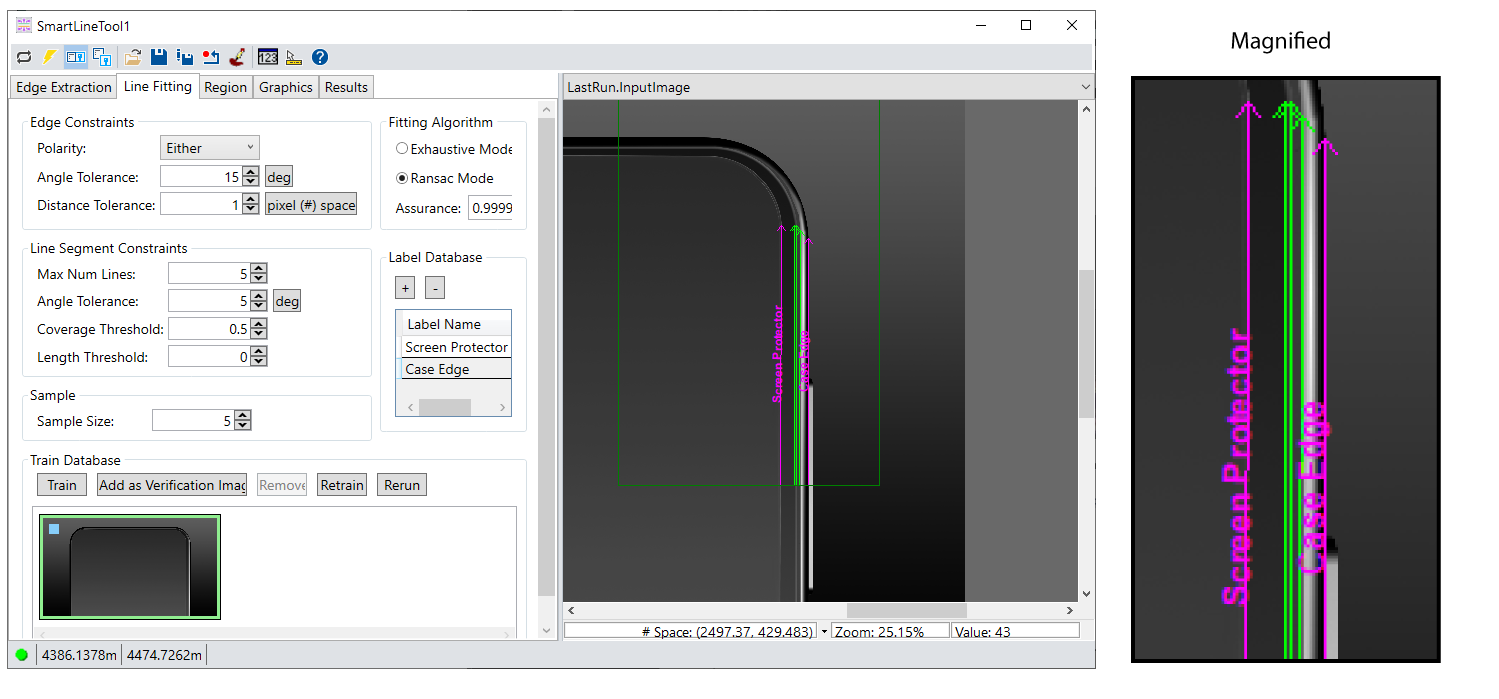
Successfully training a SmartLine tool for your application requires a comprehensive set of training images that represent the range of defects and acceptable part variations the application needs to handle in production.
Training a SmartLine tool can often be easier than configuring all the line-finding parameters offered by a LineMax tool. Be aware, however, the SmartLine tool offers the same line-finding parameters as a LineMax tool for applications where you need to specify precise edge and line constraints. See the topic Finding Lines with the LineMax Tool for details on using a LineMax tool.
See the following topics for more information: