After creating a trained pattern you can search for it in your run-time image. By default a PatMax RedLine tool locates one instance of the trained pattern with a limited range of possibilities for a change in scale, rotation and other degrees of freedom. The tool offers a set of run parameters that allow it to locate the trained pattern in a wider variety of instances.
Configure the following run parameters as needed for your application:
- Number To Find: Set this parameter to the maximum number of pattern instances you expect to find in your run-time images.
-
Accept Threshold: Specify a value low enough that the tool returns all patterns with a search score greater than or equal to the threshold.
For example, the following image shows two found patterns and their respective search scores:
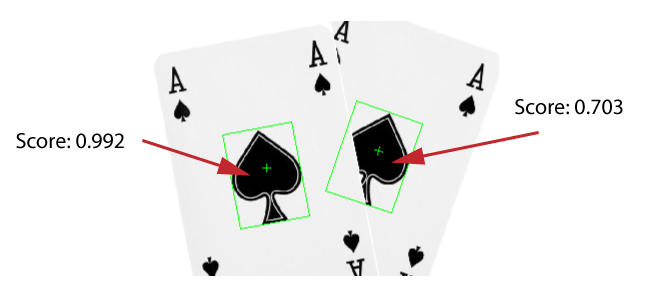
To find both of these pattern instances the Accept Threshold must be set to 0.703 or lower. If you want to exclude the partially obscured pattern, set the Accept Threshold above 0.703 and the tool will not return that found pattern as a result.
- Contrast Fraction Threshold: Allow the tool to discard possible patterns whose grey values have a low contrast compared to the trained pattern. By default the threshold is set to 0, allowing the tool to locate faint patterns in your run-time images.
- Accuracy Mode: Choose a mode other than Standard if your vision application requires speed at the cost of accuracy or accuracy at the cost of speed.
-
Coarse Accept Threshold Fraction: Enable this parameter and override the default value to choose a fraction of the Accept Threshold that should be used to evaluate candidate patterns during the initial subsampling of the image to locate coarse features.
- Angle: Specify a range for the amount of rotation a valid pattern can exhibit in your run-time images.
- Scale: Specify a range for the amount of scale a valid pattern can exhibit in your run-time images.
- XY Overlap: Specify the fraction of overlap two found pattern areas can exhibit and still be considered separate patterns. The tool discards the weaker pattern as a found result if the fraction of overlap exceeds this value.
See the following topics on additional run parameters you can use.