Spatial quantization error arises in images that have been segmented using a hard threshold because each pixel in the segmented image can assume one of only two values, object (1) or background (0). When the number of possible pixel values in a segmented image increases, pixels in the segmented image can represent the object, the background, or the edge between the object and background.
Increasing the number of possible values for pixels in a segmented image is done by assigning pixel weights. A pixel weight is a number between 0 and 1.0 that indicates what the pixel represents. A pixel weight of 1.0 means the pixel is part of an object. A pixel weight of 0 means that the pixel is part of the background. A pixel weight between 0 and 1.0 means that the pixel is on the edge of an object.
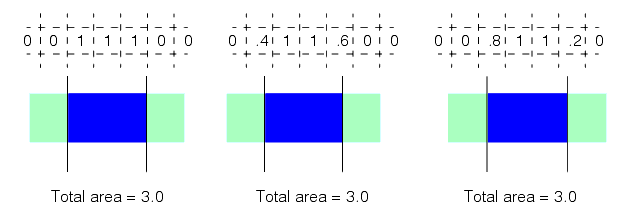
When blob measures are computed using an image composed of weighted pixel values, measures such as area are computed by summing the pixel weights. When measures are computed based on pixel weights, the effects of spatial quantization error are greatly reduced. The following figure shows a simple 3x1 pixel blob. As the blob moves relative to the pixel grid, the total of the weights of the pixels that contain nonzero pixel values remains constant. This is the case even with the more complex shapes shown in the previous two figures.
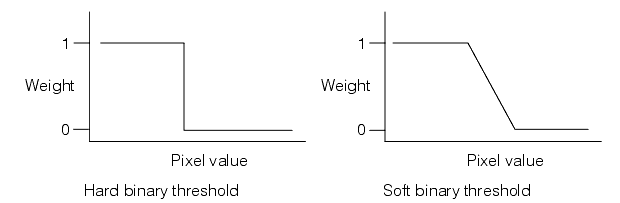
You convert a grey-scale image into an image segmented into weighted pixel values by supplying a soft binary threshold. Unlike a hard binary threshold, which consists of a single threshold value, a soft binary threshold consists of a range of threshold values. Pixels with values above the threshold range are assigned weights of 0 (background), pixels with values below the threshold range are assigned weights of 1 (object), and pixels with values within the threshold range are assigned weights between 0 and 1, typically in a linear manner. The following provides a graphical representation of a hard and soft binary threshold.