Because of the defects present in most images, such as video noise, even after segmentation and masking, images can contain undesired features. One technique that can be used to remove small features from an image is feature pruning and filling.
During the connectivity phase, the Blob tool allows you to ignore all features (both blobs and holes) below a certain size. This is called image pruning. When you prune an image of all features below a certain size, the blob measures returned for the blob that enclosed the pruned features are computed as though the pruned features still existed, but the pruned features themselves are not counted as children of the enclosing feature.
For example, if an image that contains one blob with an area of 900 pixels that contains 8 holes, each with an area of 10 pixels, is pruned using a minimum feature size of 20 pixels, the Blob tool reports the presence of a single blob with an area of 900 pixels.
You can optionally direct the Blob tool to fill in the space occupied by pruned features. This is called filling the image. In the case of labeled connectivity, the feature being filled is filled in with pixels with the same label as the enclosing blob. In the case of grey-scale connectivity, the pixel value that is used to fill the feature is the value of the pixel to the immediate left of the feature being filled. As each row of pixels in the feature is filled, the pixel value to the immediate left of that row of pixels is used as the fill value for that row.
The following figure illustrates the difference between pruning and filling an image.
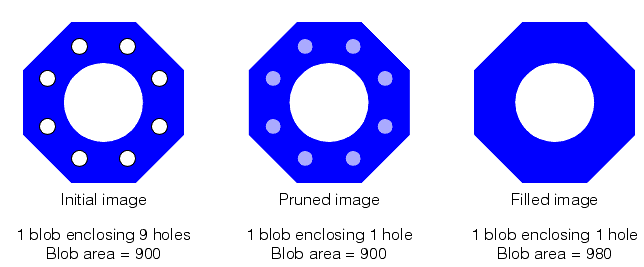
Keep in mind that the original RLE image is not actually changed by the prune or fill operation; pruning or filling only changes the information that the Blob tool returns about features within the scene. However, if you direct the tool to generate a duplicate image of the scene, or of particular features within the scene, the duplicate image does not contain the pruned or filled features.
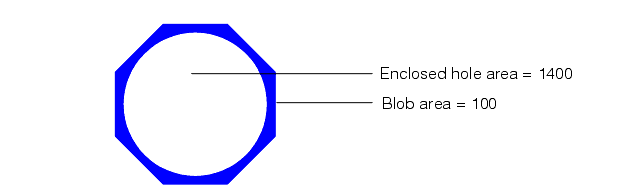
Note: If a feature that is small enough to be pruned or filled contains a feature that is not small enough to be pruned, then the enclosing feature is not pruned. The following figure shows an example of this situation. The blob has an area of 100 but encloses a hole with an area of 1400. If a prune size of 200 were used, the blob would not be pruned because it encloses a feature larger than the prune size, even though the blob is smaller than the prune size.