When you train PatMax using an image, you can exclude features from the trained pattern by supplying a mask image. The following image shows an example of how you would use a mask to exclude some features from being used in the trained pattern.
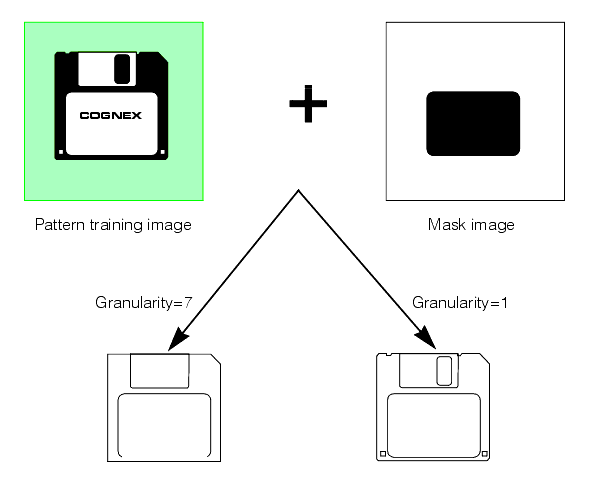
Using a mask lets you exclude features which might vary between different objects while still finding the pattern using a full range of granularities.
Note: Pattern masking is not supported for shape training since you can design your shape description to include only desired features and thus have no need to mask out unwanted features.
The mask image is interpreted as follows:
- All pixels in the training image that correspond to pixels in the mask image with values greater than or equal to 192 are considered care pixels. All feature boundary points detected within care pixels are included in the trained pattern.
- All pixels in the training image that correspond to pixels in the mask image with values from 0 through 63 are considered don't care but score pixels. Feature boundary points detected within don't care but score pixels are not included in the trained pattern. When the trained pattern is located in a run-time image, features within the don't care but score part of the trained pattern are treated as clutter features.
- All pixels in the training image that correspond to pixels in the mask image with values from 64 through 127 are considered don't care and don't score pixels. Feature boundary points detected within don't care and don't score pixels are not included in the trained pattern. When the trained pattern is located in a run-time image, features within the don't care and don't score part of the trained pattern are ignored and not treated as clutter features.
- Mask pixel values from 128 through 191 are reserved for future use by Cognex.
Note: If you use the PatQuick algorithm (which does not consider clutter pixels), then mask image pixel values from 0 through 63 are treated the same as mask image pixel values from 64 through 127.