A LineMax tool uses a set of parameters to extract edge point candidates for the features you want to detect. Setting the best values for these parameters allows a LineMax tool to find the desired edges in the shortest execution time possible.
-
To reduce the amount of data to process and improve execution time, the tool samples the runtime image and generates gradient vectors for square areas of the image defined by a gradient kernel.
The default gradient kernel size value of 2 allows the LineMax tool to evaluate the runtime image using a 2x2 square kernel to generate gradient vectors:
- Runtime images with sharp edges might require a small value for accuracy.
- Runtime images with soft features might require larger values for edge location.
In general, smaller values lead to results with higher accuracy but higher execution times, while larger values can reduce execution time at the cost of some accuracy.
-
The tool performs gradient field projection to analyze the gradient field with a series of projection regions along a specified search direction perpendicular to the orientation of the expected line segment:
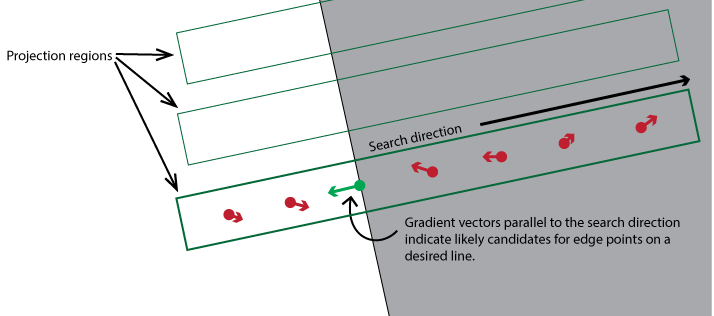
- The parameter projection length defines the size of the projection region and ultimately the quantity of regions used to analyze each gradient field. A small value includes more gradient vectors than a projection region with a larger value. In general a small value requires more time to execute while a larger value can improve the execution speed of the tool but might not detect the edges you want the tool to locate.
-
Each projection region generates multiple edge points to pass along to the line fitting phase.
-
Gradient vectors must have a magnitude higher than an absolute contrast threshold and a normalized contrast threshold.
Raise the value of normalized contrast threshold to discard false edge points in bright areas of your image. Be aware that setting it to 1 discards all edge points, making the tool effectively nonfunctional.