By default, image processing tools that take two input images operate in exactly the same way as the single-image tools described in the preceding section. The root space of the output image is based on the composition of the root space of the input image together with any transformation implied by the input region for the first image. The coordinate space tree of the second image is essentially ignored, except for computing the image alignment.
In some cases, however, you may wish to preserve information from both input images in the output image's coordinate space tree. You do this by specifying IPTwoImageSpaceTreeModeConstants or IPTwoImageSpaceTreeModeConstants for the tool's SpaceTreeMode property. When you do this, the two-image tool merges the space tree from the second image with the first image's space tree. It does this by creating a new space, with a name that you specify using the MergedSpaceTreeName property, then attaching the second image's @ space to this new space using an identity transformation (I). The newly created space reflects the alignment of the second image with respect to the first image. This merging allows you to continue to refer to features in the combined image using coordinates from either of the input images' space trees.
The following figure shows how this merge is done:
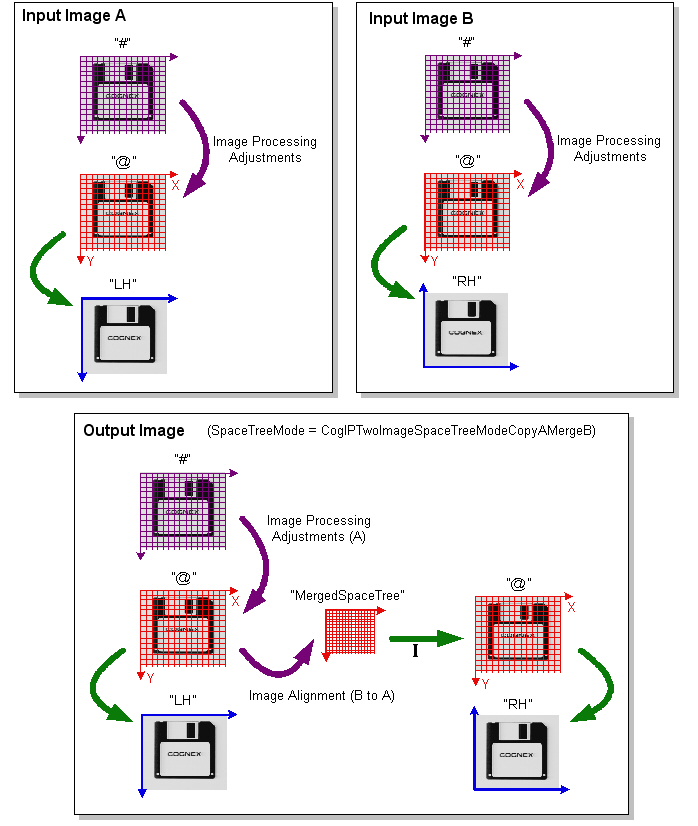
Note that in the case of the merged part of the space tree, the second space named "@" is not a true root space. If you set the selected space to "@", it will refer to the first "@" space. To refer to spaces in the merged part of the tree, you must use names like "@\MergedSpaceTree\@\RH".