The following table provides a summary of the types of adjustments made by various types of image processing tools that take a single input image.
| Operation | Sample Input | Output |
|---|---|---|
|
Affine Transformations
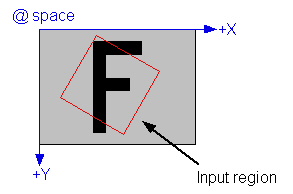
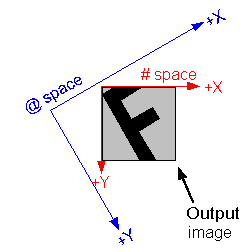
If you use the Affine Transform Tool or if you use the RegionModeConstants region mode with the Cognex one-image or two-image tool, the image processing tool sets the output image's root space to reflect the transformation between the supplied input region (an affine rectangle) and the output image. |
|
|
|
Image Flip or Rotate
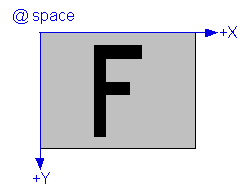
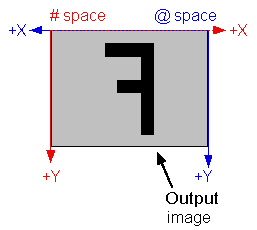
If you use the one-image tool to flip or rotate the input image, the root space of the output image will reflect the flip or rotation. |
|
|
|
Copy Region
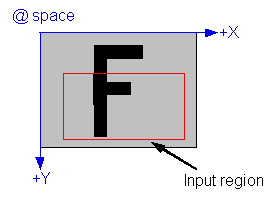
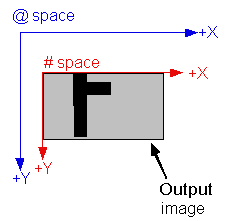
The Copy Region tool behaves like an affine transformation (described above). The output image's root space reflects the transformation between the input image's root space and the region being copied. |
|
|
|
Kernel-based Image Processing Tools
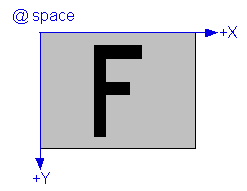
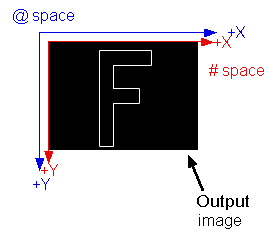
Most tools that perform image processing operations by successively applying a kernel to the pixels in an input image produce an output image that is smaller than the input image. The size reduction depends on the size of the kernel. For a 3x3 kernel (the most common size), the image is reduced in size by 2 pixels in both the X- and Y-direction. The root space in such an output image is automatically adjusted to compensate for this effect.
The Gaussian Sampling tool is an exception to this rule. That tool synthetically generates the "missing" pixels, so its output image is the same size as its input image. |
|
|