Band Pass Filtering mode determines the sharpness of an image after allowing you to remove blurred features or image noise from consideration.
Edges in grey-scale images can be described as having a higher or lower frequency based on the edge transition from light to dark or dark to light, with higher frequency edges having small transitions while lower frequency edges having longer transitions:
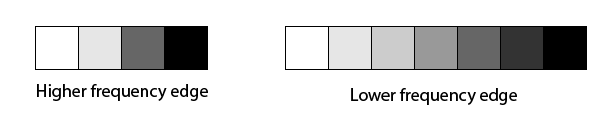
An Image Sharpness tool measures the frequency of an edge as the reciprocal of the edge transition, in pixels. For example, the frequency for transitions 10 pixels wide would be 1/10 or 0.10, and for transitions 6 pixels wide would be 1/6 or 0.166. The frequency value increases as the edges become sharper. The tool supports a maximum possible frequency of 0.50 (two pixel edge transition = 1/2 = 0.50).
The tool allows you to specify a minimum low and maximum high frequency for edges to be considered in determining the sharpness of an image. By examining your images and specifying meaningful Low Frequency and High Frequency values, you can have the tool disregard edges in an image that your vision application does not need to consider when determining image sharpness.
For example, if your image contains a textured background with low frequency edges, you might specify a minimum Low Frequency value high enough to disregard the background pixels. As another example, you might specify a maximum High Frequency value that excludes very high frequency edges representing signal noise.
The tool returns an image sharpness score based on the edge features it does not exclude from consideration.
Some notes about Band Pass Filtering mode:
- Good choice for low-contrast images with edge transitions of 10 or few grey levels
- Good for cancelling the effects of textured backgrounds or image noise
- The most time consuming of all Image Sharpness modes