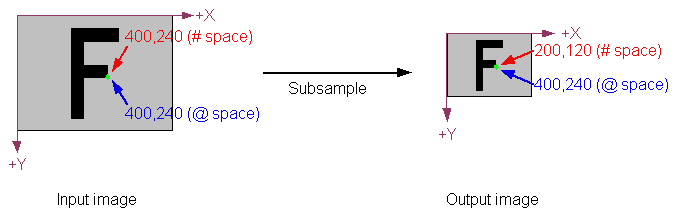
The following figure shows how this works. In the input image, pixel space (# space) and root space (@ space) are identical. The indicated point has the same location in both spaces. After subsampling the image (with a sampling factor of 2 in both the X- and Y-direction), the output image has one fourth as many pixels as the input image. Accordingly, the same location (shown in green) has changed in pixel space. In root space, however, the location has not changed, because the Gaussian Sampling tool updated the output image's root space to reflect the effect of the image processing operation. This automatic change to root space means that when you use pattern location tools, or specify regions, or perform any other operations using the image's root space, the locations you specify will correspond to the locations in the original image.