The VisionPro coordinate space tree includes functions that let you obtain a transformation object that maps points between any two spaces in the coordinate space tree. The most common way to obtain a transform from a coordinate space tree is to call the GetTransform method of a VisionPro image object. GetTransform allows you to extract a transformation that maps points between any two spaces in the tree. It also allows you to obtain transformations to or from the special pixel space "#". You can also use the image's GetTransform method with partially-qualified names, such as "." (the currently-selected space name).
The basic VisionPro two-dimensional transform is implemented as the ICogTransform2D interface. This interface implements a general two-dimensional transformation. The underlying transformation may be a linear or nonlinear transformation. For mapping points between two spaces, you use this object's MapPoint method.
In general, however, your application does not need to be concerned with whether a transformation is linear or nonlinear. In most cases, simply use the ICogTransform2D interface to map points between spaces. If you know that the actual transformation underlying a ICogTransform2D interface is linear, and you wish to use a linear transformation-specific capability, you can use the ICogTransform2D interface's LinearTransform method to obtain a new CogTransform2DLinear object.
You should note that changing the property values of this new transform do not change the values of the original transform. If you want to convert from an unknown transform type, you should use QueryInterface in C++ to determine if the transform has a CogTransform2DLinear interface. If QueryInterface succeeds, you can use the original object as a linear transform, and can directly change its values. In Visual Basic, you can simply assign the transform object to a variable that you have declared as a CogTransform2DLinear object.
A CogTransform2DLinear represents a specific 2D linear transform. You can modify any or all of the components of a CogTransform2DLinear, and you can use it to map points, vectors, and areas between coordinate spaces.
The following figure shows how you might use a transformation. An image with two user spaces is shown. The spaces are named "Calibrated" and "Label". The transformation object, shown in green, maps a given point (the location of the "X" in "COGNEX") from the user space "Calibrated" to the user space "Label".
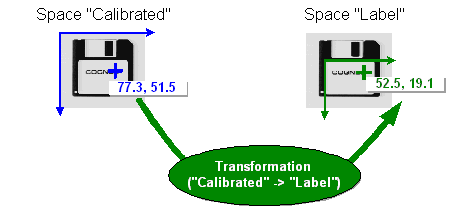
Note that the location (the "X" in "COGNEX") is the same in both images. The transformation maps the expression of the location in one user space to another user space. You can use a transformation to map any point from one user space to another.