An image's currently SelectedSpaceName determines the coordinate system used to define locations and dimensions within an image. You can switch between different selected spaces to make measurements in different coordinate systems. When you create a new image using a calibration or fixturing tool, the tool adds a new coordinate space to the input image's coordinate space tree and automatically selects that space as the new image's selected space name. At any time you can specify a different space for use as the selected space of a particular image.
The following figure shows how a typical coordinate space tree might be organized.
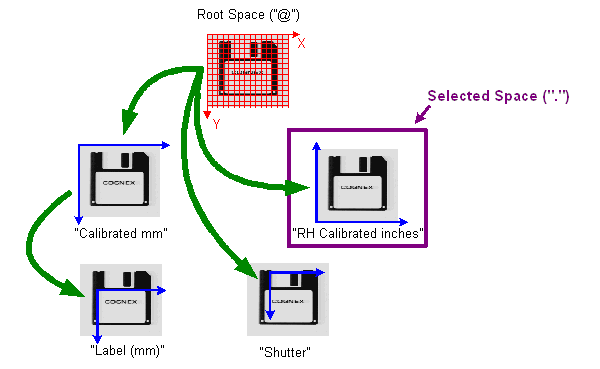
Each of the green arrows represents a transformation between two spaces in the image's coordinate space tree.
The Calibrated mm space is based on root space. The Label (mm) space is a fixtured space for working with the diskette label in calibrated space. The RH Calibrated inches space is an alternative calibrated space based on the root space. Unlike Calibrated mm, RH Calibrated inches uses a right-handed coordinate system and is calibrated in inches instead of millimeters. The Shutter space is a fixtured space based directly on the root space.
If the RH Calibrated inches space is the selected space of the image, all tool results are expressed using this space. A tool that locates the label on the diskette, for example, will return the location in terms of inches in the (X,Y) direction relative to the lower left-hand corner of the image. If you change the selected space, then results of subsequent tool operations are expressed using the newly selected space.