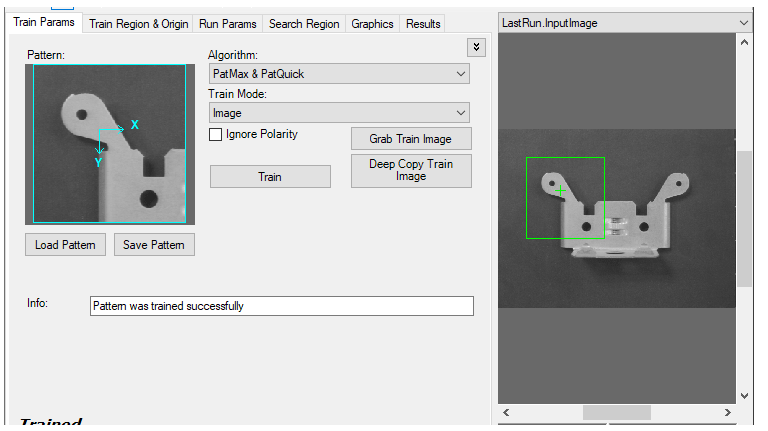
Use the Train Params tab to set training parameters related to the search pattern:
Click the Advanced Feature button:

on the far right of the tab to display advanced features.
Use the following options to configure a trained pattern: :
| Parameter | Description |
|---|---|
| Pattern | Displays the trained pattern. This is specified by the Train Region, which is highlighted by a blue border, within the Current.TrainImage. You can set the train region using the Train Region and Origin tab or by resizing its display in Current.TrainImage. The message text at the bottom of the tab indicates whether the PMAlign tool is trained. |
| Load Pattern | Opens a VisionPro persistence file, which has a VPP extension, that contains a trained pattern. |
| Save Pattern | Saves the current trained pattern into a VisionPro persistence file, which has a VPP extension. |
| Algorithm |
Select the search algorithm to use for training:
|
| Ignore Polarity | If enabled, pattern polarity is ignored. If disabled, only patterns with polarity matching the trained pattern will be found. |
| Repeating Patterns |
Use this parameter when the pattern you want to train contains elements that repeat, such as a grid or a set of bars or a pattern of parallel lines.
This parameter is valid only when you choose PatMax from the Algorithm pulldown list. |
| Train | Trains the desired pattern as specified by the train region in the Current.TrainImage. If the tool already has a trained pattern then the tool will untrain and then retrain. When the pattern is successfully trained, the text at the bottom of the control appears as Trained. |
| Grab Train Image |
Copies the Current.InputImage to the Current.TrainImage. |
| Deep Copy Train Image |
Clones the Current.InputImage and assigns a reference to that deep copy to the Current.TrainImage property.
Perform a deep copy to prevent the PMAlign tool from becoming untrained if any Fixture tool updates the coordinate space tree of the Current.TrainImage as your vision application runs. |
| Feature Grain Limits | If Auto Select is not selected, then the Coarse and Fine grain limits that you supply are used. |
| Elasticity | Specifies the amount of variance, in pixels, allowed by the PMAlign tool. In general, you should specify a nonzero elasticity value if you expect inconsistent variation in patterns in run-time images. |
| Auto Edge Threshold | Disable the automatic value if you want to set a different threshold for the absolute minimum value of edge magnitude, below which the edge direction will be randomized. |
| Info |