Use the Run Params tab to specify how to perform the pattern search, which include the run algorithm to use, thresholds and limits, and the amount of rotating and scaling allowable during the pattern search.
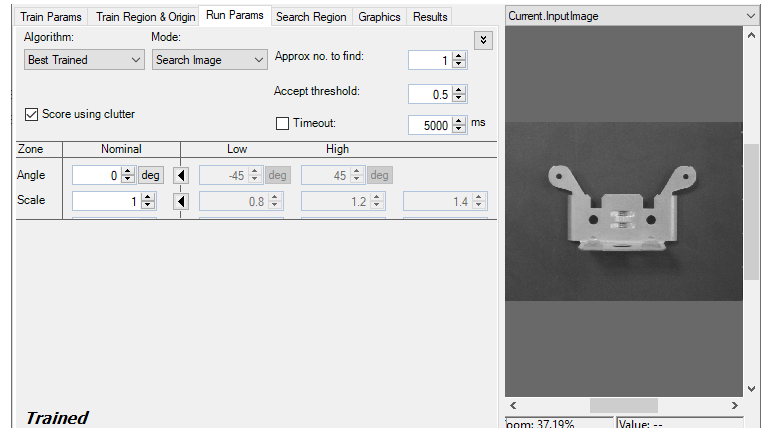
Click the Advanced Feature button

on the far right of the tab to display advanced features.
| Feature | Description |
|---|---|
| Algorithm |
Selects the search algorithm. The Patmax algorithm is more accurate than Patquick and can return additional score information, but requires more processing time.
You can also specify Best Trained, in which case the tool will run using the highest-accuracy algorithm for which it has been trained.
If you specified PatMax - High Sensitivity for the trained algorithm, specify either PatMax or Best Trained. In either case, PatMax high sens itivity mode is used.
If you specified Perspective PatMax for the trained algorithm, specify either Perspective PatMax or Best Trained. |
| Mode |
By default, the PMAlign tool uses Search Image mode to search the entire image for the coarse features that indicate the presence of the pattern it is trained to locate. Switch to Refine Start Pose mode to give this PMAlign tool a specific StartPose, which is a two-dimensional linear transformation that defines the starting location of the search. The StartPose typically comes from another vision tool that has already executed and generated results about known features in the image. Note: To use Refine Start Pose mode you must add an input terminal to expose the StartPose property for this PMAlign tool.
|
| Coarse Accept Threshold |
The PMAlign tool uses a default Coarse Accept threshold to refine early search results based on the coarse features of the pattern. You can enable the Coarse Accept Threshold and specify a different value, forcing the tool to consider more (lower value) or fewer (higher value) potential matches in each run-time image.
The threshold value cannot exceed the current value for Accept threshold. The edit control will correct the value for Accept threshold automatically if you set a value for Coarse Accept threshold higher than Accept threshold. |
| Score using clutter | If checked, then the PatMax algorithm considers extraneous or clutter features when computing the score of a pattern instance. Considering clutter features usually results in lower scores. Available for the PatMax algorithm only. |
| Approx no. to find | Specifies the number of results to look for. |
| Accept threshold | Specifies the acceptance threshold for the result score. Only results with scores greater than or equal to this value are accepted. |
| Timeout | Limits the execution time of the PMAlign inspection. |
| Zone Angle |
Specifies the angle of rotation that is allowable when PMAlign performs a pattern search. You can specify a nominal value that the PMAlign results must match exactly or you can click the
Tto specify a range of values for the results |
| Zone Scale |
Specifies the scale value to be used when PMAlign performs a pattern search. You can specify a nominal value that a searched pattern must match exactly or you can click the
Tto specify a range of values for the results |
| Zone Scale X |
Specifies the scale value in the X direction to be used when PMAlign performs a pattern search. You can specify a nominal value that a searched pattern must match exactly or you can click the
Tto specify a range of values for the results |
| Zone Scale Y |
Specifies the scale value in the Y direction to be used when PMAlign performs a pattern search. You can specify a nominal value that a searched pattern must match exactly or you can click the
Tto specify a range of values for the results |
| Use Pattern Grain Limits | If checked, then the granularity limits determined by the training pattern are used. If not checked, then the Coarse and Fine values specified are in effect. |
| Contrast Threshold | Defines the minimum acceptable contrast for a pattern instance. Only pattern instances where the average difference in pixel values across all feature boundaries exceeds this value are considered by PMAlign. |
| XY Overlap | Result candidates overlap in area if the percentage of area overlap is greater than this value .The tool discards the weaker pattern instance when two pattern instances overlap for all degrees of freedom as well as area by the specified overlap percentage. |
| Auto Edge Threshold | Disable the automatic value if you want to set a different threshold for the absolute minimum value of edge magnitude, below which the edge direction will be randomized. |
