QR Code
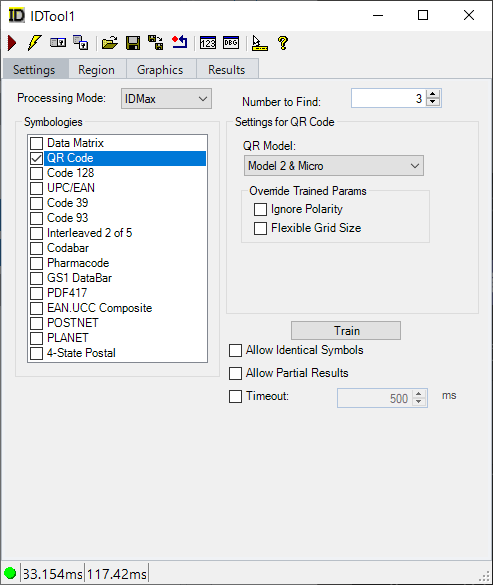
Set the following parameters for decoding IDQRCode symbols:
-
QR Model: Sets the model type for your QR codes
-
Ignore Polarity: Overrides any trained polarity setting
-
Flexible Grid Size: Overrides any trained grid size
-
Max Grid Size: Gets or sets the maximum grid size to look for. The value is used at train time. If the tool is not trained, the value is used at run time. The IgnorePolarity property allows a trained QR code to decode, at run time, a QR code that is either larger or smaller by a step size as long as the MaxGridSize is set to allow the larger code to be found. For example, if a QR code is trained as size 49x49, and the FlexibleGridSize is set to true, but the QR code in the image is size 53, the code will not be decoded. If the MaxGridSize is increased to 53, the QR code will be decoded.
-
Train: Train the ID tool with 2D symbol parameters based on the current image. Training the tool can improve its performance when all the symbols the application will decode share the same characteristics.