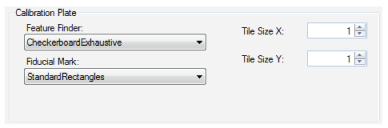
Use the following options to describe the attributes of the calibration plate (grid type spacing and fiducial type) and to control the method the tool uses to locate grid points in the image.
| Parameter | Description |
|---|---|
| Feature Finder | This value specifies how the tool will search the calibration image for calibration vertex points. This method must match the type of calibration plate that you are using.
|
| Fiducial Mark |
This value specifies the type and characteristics of the fiducial marks on the calibration plate. Note: Not all combinations of feature finding and fiducial marks are valid. If you enter an invalid combination, the tool will generate an error at calibration time.
|
| Tile Size X
Tile Size Y |
Enter the grid spacing for the calibration plate. For a checkerboard-style plate, this is the tile size. For a grid-of-dots calibration plate, this is the spacing between dot centers in the X- and Y-direction. Enter the grid spacing using real-world units of measurement you want to use for your vision application. For example, if you want to use inches for your application and your calibration plate uses tiles that are one-half inch in size, enter a value of 0.5. Note: If you are using a calibration plate that specifieds grid spacing, the tool replaces any grid spacing values that you have entered with those defined by the plate markings. The units (inches or mm) specified by the plate markings are discarded.
|
| Parameter | Description |
| Feature Finder |
This value specifies how the tool will search the calibration image for calibration vertex points. This method must match the type of calibration plate that you are using.
|
| Fiducial Mark |
This value specifies the type and characteristics of the fiducial marks on the calibration plate. Note: Not all combinations of feature finding and fiducial marks are valid. If you enter an invalid combination, the tool will generate an error at calibration time.
|
|
Tile Size X Tile Size Y |
Enter the grid spacing for the calibration plate. For a checkerboard-style plate, this is the tile size. For a grid-of-dots calibration plate, this is the spacing between dot centers in the X- and Y-direction.
Enter the grid spacing using real-world units of measurement you want to use for your vision application. For example, if you want to use inches for your application and your calibration plate uses tiles that are one-half inch in size, enter a value of 0.5.
Note: If you are using a calibration plate that specifieds grid spacing, the tool replaces any grid spacing values that you have entered with those defined by the plate markings. The units (inches or mm) specified by the plate markings are discarded.
|