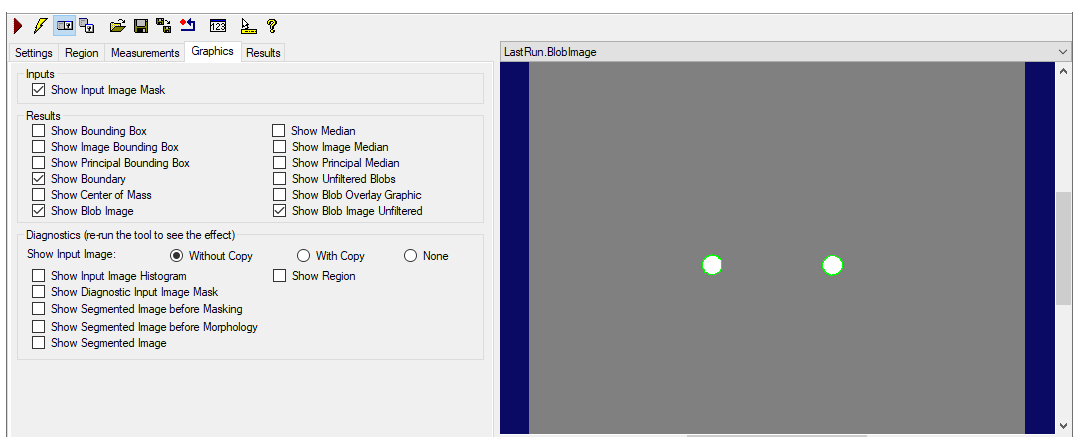
Use the Graphics tab to select what results to see from using the Blob tool. Some of the edit control image buffers appear only if certain types of results are selected.
Check Show Input Image Mask to show a graphic representing the run-time mask, if you supplied one. The graphic is shown on the Current.InputImage display.
Results appear in the LastRun.InputImage and the LastRun.BlobImage and LastRun.BlobImageUnfiltered buffers if enabled.
- Show Bounding Box, Show Image Bounding Box, Show Principal Bounding Box -- displays the bounding boxes of each blob result in the LastRun buffers.
- Show Boundary -- outlines each blob result in the LastRun buffers.
- Show Center of Mass -- highlights the center of mass of each blob result in the LastRun buffers.
- Show Median, Show Image Median, Show Principal Median -- highlights the median of each blob result in the LastRun buffers.
- Show Unfiltered Blobs -- displays all unfiltered blobs and holes in the LastRun buffers.
- Show Blob Overlay Graphic -- displays translucent overlay graphics over blobs and holes in the image.
- Show Blob Image -- generates a synthetic image showing the blobs.
- Show Blob Image Unfiltered -- generates a synthetic image showing the blobs but ignoring the effect of any filters specified in the Measurements tab.
For more information about the diagnostics values you can select, see LastRunRecordDiagEnableAPI for the Blob tool.
- Show Input Image Histogram -- allows tool to create LastRun.Histogram buffer. If this is not set, then the LastRun.Histogram is not available.
- Show Segmented Image before Masking -- includes a viewable version of the segmented image, before morphology and masking, in the LastRun.InputImage. The segmented image graphics appear only in the LastRun.InputImage buffer. If none of the segmented image options is selected, then this buffer is not created. .
- Show Segmented Image before Morphology -- includes a viewable version of the segmented image, before morphology, in the LastRun.InputImage.
- Show SegmentedImage -- includes a viewable version of the segmented image in the LastRun.InputImage. See also SaveSegmentedImage.
- Show Region displays the region of interest in the LastRun.InputImage, if it is available.
- Show Diagnostic Search Image Mask displays the run-time mask, if one was specified.
The Show Input Image option buttons let you specify whether a reference to the input image or a deep copy of the input image is displayed for the LastRun.InputImage. You can also specify that no image be displayed.