Use the Image Properties tab to define a region of interest and output pixel format:
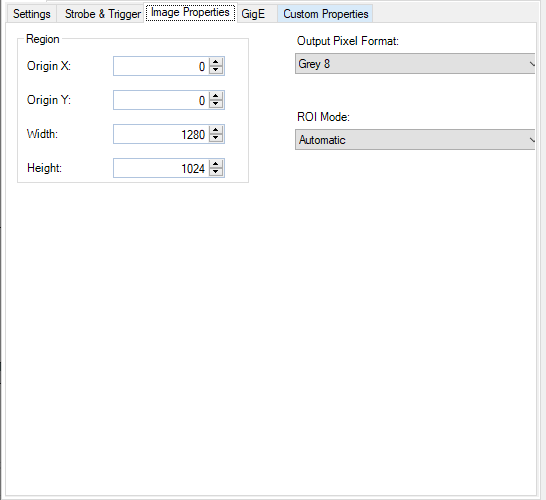
Use the fields under Region to specify the origin, width, and height of the region of interest.
Use the Output Pixel Format list to choose one of the following pixel formats:
| Format | Description |
|---|---|
| Grey 8 | Grey scale images that offer 256 possible shades of grey from black to white. |
| Grey 16 | Grey scale images that offer 16-bit encoding. A 16-bit greyscale image supports 65,536 grey values, but you must be using a 16-bit capable camera in order to produce images that exhibit this larger range. Choosing Grey 16 when you are using an 8-bit greyscale or 24-bit RGB camera produces images that are stored using the Grey 16 class but support only 256 possible grey values. |
| PlanarRGB24 | An image that uses 3 coincident arrays of 8-bit pixel values to represent shades of red, green and blue. Use this option with a supported color camera to generate color images for your vision application. If you select this option with a grey scale camera, the output images use the PlanarRGB24 class with the values for red, green, and blue in each array set to identical values to generate a corresponding grey pixel value. |
| Automatic | Allows QuickBuild to generate images with the appropriate output pixel format based on the type of camera you are using and the video format you chose on the Settings tab. |
ROI Mode (Region of Interest) allows you to choose between Automatic and Manual mode:
| Mode | Description |
|---|---|
| Automatic | Automatic mode will adjust the region of interest to meet the limitations of the hardware, and then apply a pel buffer sub-window to produce the actual region of interest requested. For example, if the width is not adjustable on the camera while the height is, Automatic mode will use the hardware setting to set the height and then set a pixel buffer sub window for the requested width. |
| Manual |
Manual mode should only be used if a corect image cannot be acquired with Automatic mode. This will primarily be with cameras where the image size is determined by something other than ROI settings. For example, a linescan camera that is being used in a mode where the camera acquires lines while a trigger signal is high, resulting in a variable-length image .
In Manual mode, ROI settings are written without modification to hardware, providing the corresponding setting is writable. If the setting violates a hardware limit or modulo requirement, the results are undefined. Some cameras will not produce an error, but will not acquire an image while the settings are invalid.
In Manual mode, the acquired image is whatever is sent back from the camera (no sub-window is applied). This may be larger or smaller than the settings for the region of interest, depending on how the camera works.
The primary benefit of Manual mode is for use with camera whose image size determined by something other than the settings for the region of interest. |