Use the Train Region & Origin tab to define the train region, which defines the area of the Current.TrainImage buffer that becomes the trained pattern. You can also define the train region graphically in the Current.TrainImage buffer. It may be easier to first specify the training region graphically, then use this tab to fine tune the train region parameters. The PMAlign edit control updates the train region values so that the values on this tab always match the shape of the train region in the Current.TrainImage buffer.
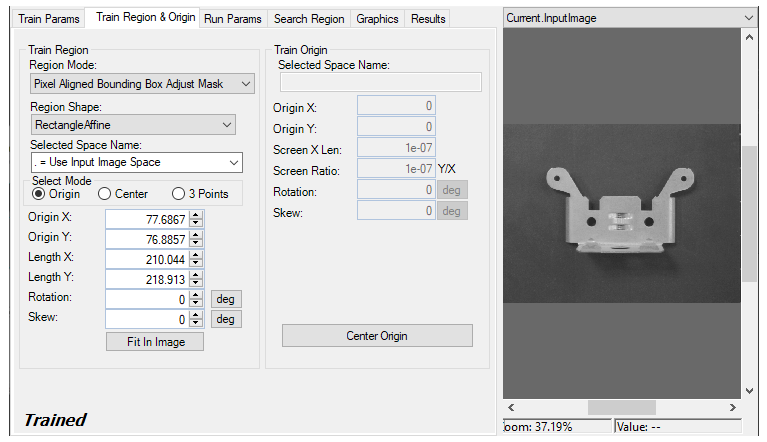
Some of the parameters on this tab, such as Rotation and Skew, can be specified in degrees (default) or radians. The underlying tool keeps the values in radians but the edit control converts them to degrees when appropriate.
Configure the following Train Region features:
| Feature | Description |
|---|---|
| Region Mode |
Defines the bounding box for the region.
|
| Region Shape |
Select the shape of the input region. Selecting None=Use Entire Image means that the tool uses the entire input image. A PMAlign tool supports the following input region shapes:
The set of region-defining parameters that appear depend on the region shape you use. |
| Selected Space Name | The cordinate space in which the training region is interpreted. For information, see Coordinate Space Names. |
| Select Mode | Available when Region Shape is Rectangle or RectangleAffine. Selects the set of parameters that define the rectangle. If RectangleAffine is chosen, note that the angles of rotation and skew can be specified in degrees or radians, although the underlying tool keeps the measurements in radians. |
| Fit In Image |
Centers the train region within Current.TrainImage. |
In addition configure the following Train Origin features:
| Feature | Description |
|---|---|
|
Origin X Origin Y Screen X Len Screen Aspect Rotation Skew |
Values that define the location and orientation of the train region's origin. These values will change if you modify the origin graphically. Note that the angles of rotation and skew can be specified in degrees or radians. |
| Center Origin | Sets the train region's origin at the center of the train region. |