Use the Scoring tab to create a collection of scoring functions to use when generating results. The available scoring functions depend on whether you configure to search for a single edge or an edge pair.
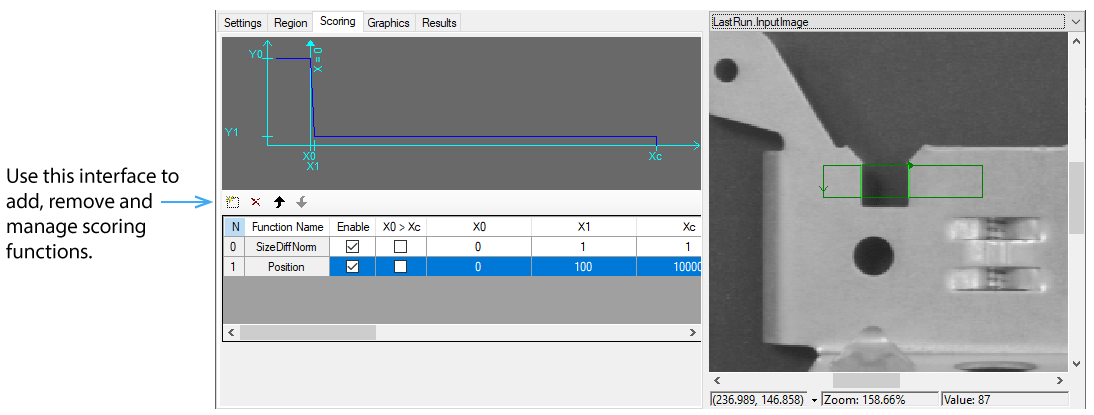
The list at the bottom of the tab displays the functions that you have added to the collection. When you highlight a scoring function, the tab displays a graph of the scoring function that labels the function parameters that you specify.
If Edge Mode is Single Edge, the tab makes the following scoring functions available:
- Contrast: Scores based on the contrast of a candidate edge.
- Position: Scores based on the absolute position of the candidate edge.
- PositionNeg: Scores based on the position of the candidate edge, with negative values allowed.
If Edge Mode is Edge Pair, the tab makes the following scoring functions available:
- Contrast: Scores based on the contrast of a candidate edge pair.
- Position: Scores based on the absolute position of the candidate edge pair.
- PositionNeg: Scores based on the position of the candidate edge pair, with negative values allowed.
- PositionNorm: Scores based on the absolute normalized position of an edge pair.
- SizeDiffNorm: Scores based on the normalized size of the difference between the candidate edge pair size and the expected edge pair size.
- SizeDiffNormAsym: Scores based on the normalized size of an edge pair with a two sided mapping.
- SizeNorm: Scores based the normalized size of an edge pair.
- Straddle: Returns 1 if the candidate edge pair straddles found position, else 0.
For each scoring function you configure the following parameters:
| Parameter | Description |
|---|---|
| N | The index of the scoring function within the function collection |
| Function Name | The name of the function. You can add more than one of the same type of scoring function; the Results tab tracks the functions with both the function name and the index into the function collection. |
| Enabled | Check this box if you want this scoring function to be applied when the tool runs the next time. Disabling a scoring function eliminates the impact of the Scoring function. |
| X0 > Xc | Represents the orientation of the graph. For the function to be valid, X1 must be between or equal to X0 and Xc. This column allows you to swap X0 and Xc, if necessary. |
| X0, X1, Xc, Y0, Y1 | The parameter values for a one-sided function, or the first set of values for a two-sided function. See each scoring function class for information about these values. |
| X0h > Xch | Represents the orientation of the graph. Applies only to two-sided functions (the SizeDiffNormAsym function). To be valid, X1h must be between or equal to X0h and Xch. This column allows you to swap X0h and Xch, if necessary. |