Your VisionPro USB security key contains programmed licenses that enable your vision application to acquire images and run vision tools. The security key can be updated with additional licenses and the latest security key firmware.
See the following sections for more information:
The topic VisionPro Licenses lists all the VisionPro licenses required by specific vision tools. Contact Cognex Support if you want to update the licenses on your security key.
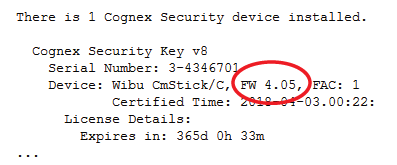
Use Cogtool to determine the firmware on the security key attached to your computer. Enter the following in a command prompt window:
cogtool --print | more
Note the firmware version in the output:
See the topic About this Release for the latest security key firmware supported in this release. If you are using a security key with a previous version of firmware, contact Cognex Support for assistance in upgrading to the latest version. Keep your security key firmware up to date to take advantage of the latest features and improvements to Cognex software security.