Your VisionPro installation includes the 3D HandEye Field Calibrator, which can guide you through the process of creating a rigid 3D transformation that maps 3D points from a Cognex sensor to the 3D space defined by a robot coordinate system.
During the calibration process a stationary Cognex sensor captures point clouds of a calibration target as it moves to a series of points in the 3D space of the robot coordinate system. The utility generates a calibration transformation and records it an XML file that can be imported to your vision application to link feature locations in 3D sensor images to 3D locations in the robot coordinate system.
See the following sections for more information:
Launch the 3D HandEye Field Calibrator through the Start menu or by double-clicking the icon on the Windows desktop:
The Calibrator supports a graphical user interface for capturing different views of the calibration target and generating the calibration transform:
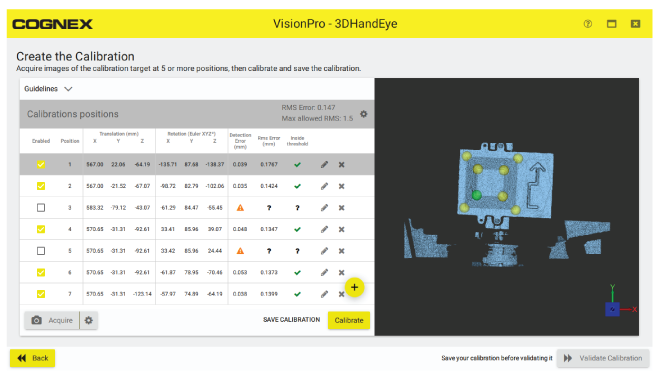
The Calibrator supports its own documentation for more information.
VisionPro includes the Cog3DCalibrationFromXMLScript CogToolBlock for using the transform stored in the XML file generated by the 3D HandEye Field Calibrator.
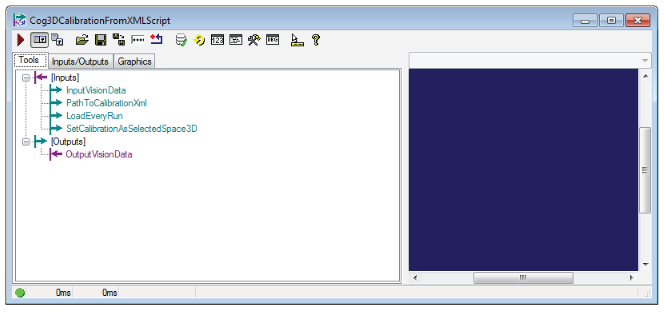
The CogToolBlock contains a script that adds the calibrated coordinate space to the 3D coordinate space tree of a given input image. The CogToolBlock contains the following input terminals:
- InputVisionData: Either a CogImage16Range or a Cog3DPointCloudMesh representing the input image that will have the transform data added to its 3D coordinate space tree.
- PathToCalibrationXml: A string representing the path to the XML file with the calibration data.
- LoadEveryRun: A boolean value indicating whether the script should load the XML file every time it is run (necessary if the XML data changes between runs), or whether the XML file should be loaded only once.
- SetCalibrationAsSelectedSpace3D: A boolean value indicating whether the script should set the calibrated 3D coordinate space as the selected space of the vision data specified by InputVisionData, or whether the selected space should be left unchanged.
The CogToolBlock contains a single output terminal for the CogImage16Range or a Cog3DPointCloudMesh. This image is the exact image as was provided by InputVisionData, not a copy. This output is provided for convenience and clarity.
The Cog3DCalibrationFromXMLScript ToolBlock can be loaded programmatically for your Visual Studio applications.