GigE Vision Camera Configuration
After you install the CFG-8724 you can attach up to four GigE Vision cameras. See the GigE Vision Cameras User's Guide, available from the Start menu, for more details on connecting and using GigE Vision cameras with your Cognex software.
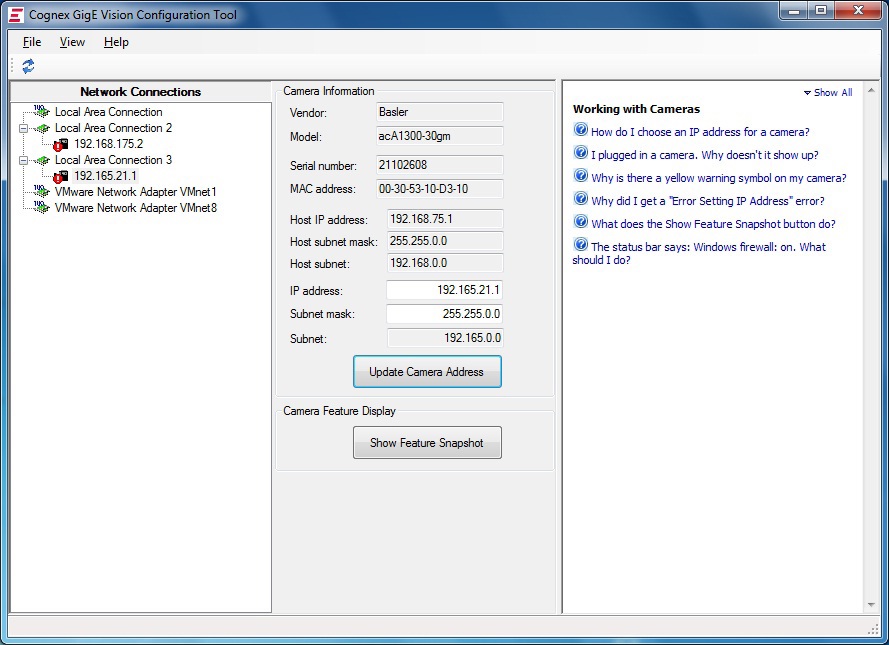
Once the cameras are connected, you must use the GigE Vision Configuration Utility, available from the Start menu, to set the IP address for each frame grabber port and each GigE Vision camera. The GigE Vision Configurator displays all network connections that correspond to ports on the frame grabber as well as any GigE Vision cameras connected to them:
For additional information on using a GigE Vision camera with your Cognex vision software, see your software product documentation. In addition, the Cognex technical support site may contain additional documentation about using GigE vision for your machine vision application.