Your Cognex sales representative can provide a USB security key programmed with the desired licenses for your vision application. Attach the key to your computer before you launch any VisionPro application.
See the following sections for more information:
Every vision tool requires at least one enabled license on your Cognex USB security key, and some vision tools require multiple licenses. For example, the ID tool requires a combination of the licenses VisionPro.Barcode, VisionPro.Symbol, or VisionPro.SymbolVerifyBasic to locate 1D or 2D symbologies, depending on the needs of your vision application.
The following table lists the VisionPro tools and the licenses they require:
| VisionPro Tool | Licenses | Notes |
GigE Vision Acquisition (AcqFifo Tool and QuickBuild Image Source) | VisionPro.Cam2: Up to 2 cameras |
|
| DS1000 and DS900 Series Sensor types | VisionPro.CamDSGigE | Must also include one of the following licenses: VisionPro.Cam2, VisionPro.Cam4, VisionPro.Cam8, VisionPro.CamMulti, or VisionPro.SWAcquisition |
| Cognex Industrial Cameras (GigE Vision) | VisionPro.CamCICGigE | Must also include one of the following licenses: VisionPro.Cam2, VisionPro.Cam4, VisionPro.Cam8, VisionPro.CamMulti, or VisionPro.SWAcquisition |
Any GigE Vision camera | VisionPro.CamAnyGigE | Includes Cognex Industrial Cameras except DS1000 or DS900 Series Sensor types Must also include one of the following licenses: VisionPro.Cam2, VisionPro.Cam4, VisionPro.Cam8, VisionPro.CamMulti, or VisionPro.SWAcquisition |
| 3D Align Tool | VisionPro.3DAlign | |
| 3D CAD Import Operator | VisionPro.3DCad | |
| 3D Cross Section Tool | VisionPro.3DRangeTools | VisionPro.CrossSection | |
| 3D Fixture From Plane Script | VisionPro.3DStitch | |
| 3D Fixture Script | VisionPro.3DStitch | |
| 3D Height Calculation Tool | VisionPro.3DRangeTools | |
| 3D-Locate API | VisionPro.3DLocate | |
| 3D Plane Estimation Tool | VisionPro.3DStitch | |
| 3D Vision Data Rerender Tool | VisionPro.3DRangeTools | |
| 3D Volume Calculation Tool | VisionPro.3DRangeTools | |
| AlignPlus 2D Hand-Eye Calibration | VisionPro.HandEyeCalib2D | |
| Blob Tool | VisionPro.Blob | |
| Caliper Tool | VisionPro.Caliper | |
| Checkerboard Calibration Tool | VisionPro.Calib | Other Cognex Calibration and Fixturing tools do not check the VisionPro.Caliblicense. |
| CNLSearch Tool | VisionPro.CnlSearch | |
| Color Extractor Tool | VisionPro.Color | |
| Color Match Tool | VisionPro.Color | |
| Color Segmenter Tool | VisionPro.Color | |
| Composite ColorMatch Tool | VisionPro.Color | |
| Data Analysis Tool | VisionPro.DataAnalysis | |
| Dimensioning Tools | VisionPro.Dimensioning | Find Line/Circle Fit Line/Circle/Ellipse/Corner |
| Edge Blob | VisionPro.EdgeBlob & VisionPro.Blob | |
| DS Field Calibrator Utility | VisionPro.CamDSGigE: Single-sensor calibration VisionPro.CamDSGigE | VisionPro.3DStitch: Multiple-sensor calibration | |
| ID Tool | VisionPro.Barcode: 1D symbologies VisionPro.Symbol: 2D symbologies VisionPro.SymbolVerifyBasic: Data Matrix symbols with any process control metric enabled | |
| Image Processing Tools | VisionPro.GMorph (ICogIPOneImageGreyMorphology only) | Other Image Processing tools do not check this license. |
| LineMax Tool | VisionPro.LineMax VisionPro.LineMaxMulti | VisionPro.LineMaxMulti for multi-line finding and edgelet-only return |
| Model Maker | VisionPro.ModelMaker | Used to create and edit synthetic models for PMAlign. |
| Multithreading Support | VisionPro.Multithread | Enables optimized code path for multithreading. |
| OCRMax Tool | VisionPro.OCR: 8-bit images VisionPro.OCR & VisionPro.16BitTools: 16-bit images VisionPro.OCR & VisionPro.3DRangeTools: 3D range images | |
| OCV Tool | VisionPro.OCV | |
| OCVMax Tool | VisionPro.OCVMax | |
| PatInspect Tool | VisionPro.PatInspect | |
| PMAlign Tool | VisionPro.PatMax VisionPro.PatQuick (PMAlign tool using only the PatQuick algorithm) VisionPro.SynthPatMax VisionPro.PatFlex | VisionPro.PatMax includes the PatQuick and Perspective PatMax algorithms |
| PMAlign Tool 16-bit (PatMax algorithm) | VisionPro.PatMax & (VisionPro.16BitTools | VisionPro.3DRangeTools) | |
| PMAlign Tool 16-bit (PatQuick algorithm) | VisionPro.PatQuick & (VisionPro.16BitTools | VisionPro.3DRangeTools) | |
| PMAlignMultiTool | VisionPro.PatMax VisionPro.PatQuick (PMAlign tool using only the PatQuick algorithm) | |
| Point PatMax | VisionPro.PatMax | |
| SearchMax Tool | VisionPro.SearchMax | |
| SearchMax (High Accuracy) | VisionPro.HighAccuracyCorrelation | |
| SurfaceFX Tool | VisionPro.SurfaceFX | |
| Vision Data Stitch Tool | VisionPro.3DStitch |
You have several options for determining which licenses are enabled on the USB security key.
Use Cogtool, a utility included with your VisionPro installation, to determine which VisionPro licenses are enabled on your security key.
Enter the following in a command prompt window:
cogtool --print | more
The output will look similar to the following. Your output depends on the vision tool options you licensed through your Cognex sales representative.
There is 1 Cognex Security device installed.

  Cognex Security Key v8
    Serial Number: 3-4346701
    Device: Wibu CmStick/C, FW 4.05, FAC: 1
            Certified Time: 2018-04-03.00:22:

      License Details:
        SWUP: {2018.1-2025.12}
      Tools Programmed:
          Cognex.Generic
          Designer.Deployment
          Designer.Development
          Designer.Generic
          VisionPro.16BitTools
          VisionPro.3DAlign
          VisionPro.3DCad
          VisionPro.3DLocate
          VisionPro.3DRangeTools
          VisionPro.3DStitch
          VisionPro.BarCode
...
...

          VisionPro.SymbolVerifyBasic
          VisionPro.SynthPatMax

    Runtime Configuration
      version: 6.60 (meets requirement)
      minimum required version: 6.50

There are 0 Cognex Vision boards installed.

Security Service Configuration
No compatible services detected.Be aware the Cogtool utility does not have information regarding the release date for your installed version of VisionPro, so it might list licenses that are no longer valid because the security key is not within its valid software update maintenance period. See the section Software Update Maintenance Period for details.
Choose Help->License... from QuickBuild to determine which VisionPro licenses are enabled on your computer. QuickBuild displays a listing similar to the following:
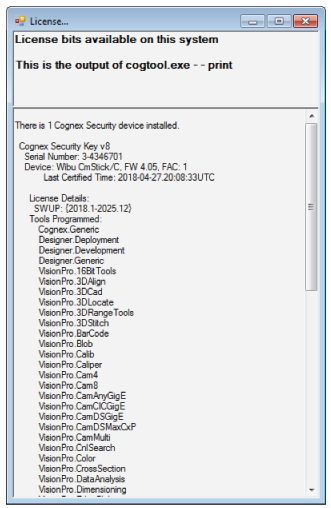
Use the VisionPro security API and determine which licenses are enabled with the [M:Cognex.VisionPro.CogLicense.GetLicensedFeatures(System.Boolean, System.Boolean)] method within your vision application. The following code example lists each enabled license:
CogStringCollection licensedFeatures;
licensedFeatures = CogLicense.GetLicensedFeatures(false, false);

foreach (string feature in licensedFeatures)
  System.Console.WriteLine(feature);
Be aware that your security key might have enabled licenses but they do not appear in this list because your security key is not within its valid software update maintenance period. See the section Software Update Maintenance Period for details.