This topic contains the following sections.
VisionPro reads the I/O configuration from the VisionPro.ini file in the Windows or WINNT directory. For the MVS-8504 with the Opto-Isolated I/O module, make sure these lines appear in VisionPro.ini:
[CogFrameGrabber8504 #0]
IOConfig = External
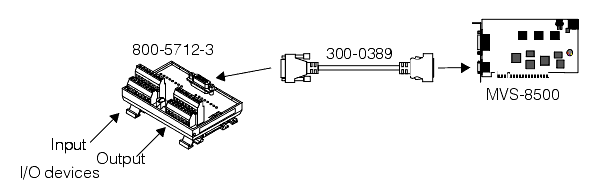
I/O signals using the Opto-Isolated I/O configuration map to physical connectors using the Opto-Isolated I/O module (P/N 800-5712-3). The Opto-Isolated I/O module makes available eight optically isolated input lines and eight optically isolated output lines. Four of the output lines can be configured as strobes, and four of the input lines can be configured as triggers.
The following figure shows how you connect I/O signals using the Opto-Isolated I/O module.
The following table lists the physical connections to the Opto-Isolated I/O module. In the table, Software line indicates the number assigned in software to the input or output. You access these software lines using CogInputLines and CogOutputLines collections. Signal name indicates the name of the hardware signal, as described in the MVS-8500 Hardware Manual. Consult that manual for a complete description of hardware signal names, connections, and installation information.
Note: The MVS-8500L frame grabber (single-channel PCI Express) provides a total of eight I/O lines. These lines are numbered 8-15. Even though the CogInputLines and CogOutputLines collections indicate the presence of 16 lines, only the upper 8 lines (values 8 through 15) can be used on the MVS-8500L.
Note that some of the input/output lines may be used by an acquisition FIFO. If you enable an output line that is used by an acquisition FIFO as one of the reserved strobe lines, the strobe will not fire unless you disable the line. Similarly if you enable an input line that is used by a FIFO as a reserved trigger line, you will not receive triggers unless you disable the line. In these cases, the input line CanBeEnabled and output line CanBeEnabled properties may return True even if the FIFO reserves the lines for itself.
| Software Line | Signal Name | Opto-Isolated I/O Label |
| InputLines(0) | TTL_BI_0 | IN 0 (+/-) |
| InputLines(1) | TTL_BI_1 | IN 1 (+/-) |
| InputLines(2) | TTL_BI_2 | IN 2 (+/-) |
| InputLines(3) | TTL_BI_3 | IN 3 (+/-) |
| InputLines(8) | TTL_BI_8 (Trigger 1) | IN 4 (+/-) |
| InputLines(10) | TTL_BI_10 (Trigger 2) | IN 5 (+/-) |
| InputLines(12) | TTL_BI_12 (Trigger 3) | IN 6 (+/-) |
| InputLines(14) | TTL_BI_14 (Trigger 4) | IN 7 (+/-) |
| OutputLines(4) | TTL_BI_4 | OUT 0 (+/-) |
| OutputLines(5) | TTL_BI_5 | OUT 1 (+/-) |
| OutputLines(6) | TTL_BI_6 | OUT 2 (+/-) |
| OutputLines(7) | TTL_BI_7 | OUT 3 (+/-) |
| OutputLines(9) | TTL_BI_9 (Strobe 1) | OUT 4 (+/-) |
| OutputLines(11) | TTL_BI_11 (Strobe 2) | OUT 5 (+/-) |
| OutputLines(13) | TTL_BI_13 (Strobe 3) | OUT 6 (+/-) |
| OutputLines(15) | TTL_BI_15 (Strobe 4) | OUT 7 (+/-) |