This topic contains the following sections.
This topic shows you how to specify and configure polygons as input regions to vision tools. Not all vision tools support polygons as input regions, and among the tools that do support them, the level of support varies from tool to tool.
To use a polygon input region, click on the Region Shape drop-down list and select CogPolygon. To append or insert vertices to the polygon, click on the add button in the grid control that displays the polygon vertices
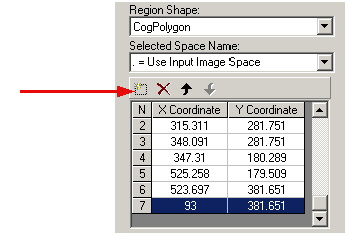
To adjust the location of a vertex in the polygon, click and drag it on the image display or select the vertex in the grid control and adjust its coordinates. To delete one or more vertices, select them in the grid control and click the delete button (the red "X").
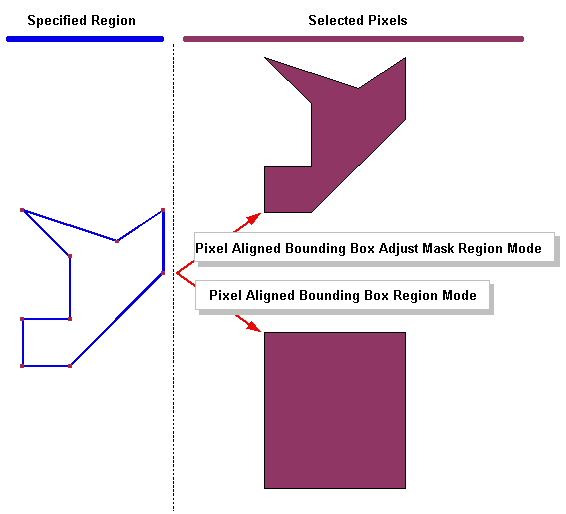
As is the case with all region shapes, which pixels are selected for processing when you supply a polygon input region depends on both the region you specify and the CogRegionModeConstants that you specify. If you specify Pixel-Aligned Bounding Box mode, then all the pixels contained within the pixel-aligned bounding box of the polygon are selected. If you specify Pixel-Aligned Bounding Box Adjust Mask mode, then only the pixels that actually lie within the polygon are selected. The following figure illustrates the difference between these two modes:
The following table lists the tools that support polygon input regions and which region mode each tool supports.
| Tool | Bounding Box | Bounding Box Adjust Mask |
| 2D Symbol | Yes | No |
| Blob | Yes | Yes |
| CNLSearch (train and search) | Yes | Yes |
| Histogram | Yes | Yes |
| Image Sharpness | Yes | No |
| IPOneImage tools | Yes | No |
| IPTwoImage tools | Yes | No |
| PDF 417 | Yes | No |
| PMAlign (train and search) | Yes | Yes |
| Sobel | Yes | No |
If any two segments of a polygon intersect, other than at a polygon vertex, the polygon is complex. The following figure shows a complex polygon:
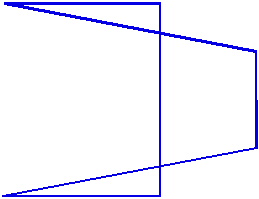
The definition of what is 'inside' and what is 'outside' of a complex polygon depends on the CogPolygonFillConstants.
The CogPolygon object lets you specify the polygon fill method programmatically using the FillMode property. If you are using a polygon input region through a tool edit control, the control does not let you select the fill method. When used through a control, the even/odd method (CogPolygonFillConstants) is always used.
Note: You can programmatically change the fill mode of a polygon region used by a tool edit control.