This topic contains the following sections.
Each CogCaliperResults object includes two 1-dimensional images, the GetProjectionValues and the GetFilteredValues.
This topic shows you how to create displayable versions of these images.
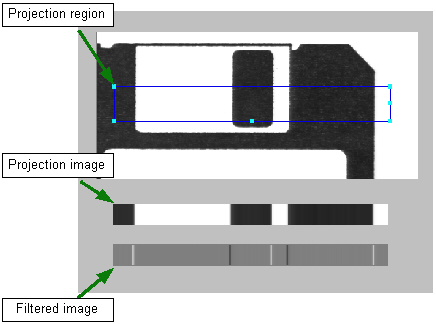
Because the GetProjectionValues method returns an array of type Double, you must convert the elements into Byte values. To display the values, you must set the pixels in a CogImage8Grey to the values in the array by following the steps shown below.
// Create and allocate pixels for display image CogImage8Grey coDispImage = new CogImage8Grey(coCal.Results.GetProjectionValues().Length, 40);// Populate the image's pixels from the projection image for (int i = 0; i < 39; ++i) for (int j = 0; j < coCal.Results.GetProjectionValues().Length -1; ++j) coDispImage.SetPixel(j, i, (Byte) coCal.Results.GetProjectionValues()[j]);
The GetFilteredValues method also returns an array of type Double, but unlike the projection image, it has values in the range from -255 through +255. In addition to converting these values to Byte, you must also adjust the range of values to be from 0 through 255.
// Create and allocate pixels for display image CogImage8Grey coSynImage = new CogImage8Grey(coCal.Results.GetFilteredValues().Length, 40);// Populate the image's pixels from the filtered image for (int i = 0; i < 39; ++i) for (int j = 0; j < coCal.Results.GetFilteredValues().Length - 1; ++j) coSynImage.SetPixel(j, i, (Byte)((coCal.Results.GetFilteredValues()[j] + 255) / 2));