This topic contains the following sections.
During a typical VisionPro installation, the installer launches the VisionPro Controls Wizard utility to populate the tool palette in Microsoft Visual Studio with the latest set of VisionPro edit controls. The wizard detects which versions of Visual Studio are installed and supported in this release:
In the following case, only Visual Studio 2015 was installed from the list of supported Visual Studio releases:
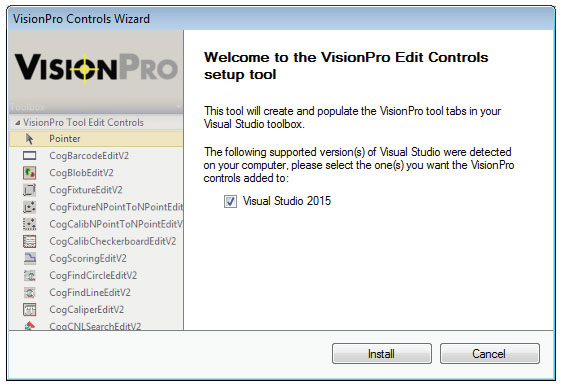
If you did not allow the VisionPro Controls Wizard to run during the installation, you can launch it anytime later from Start->Cognex->VisionPro->Utilities->VisionPro Controls Wizard.
The wizard can take several minutes to complete. Be aware that automated installation of VisionPro edit controls is not supported for Visual Studio Express.
Be aware that if you configure Visual Studio to start as an elevated process, the VisionPro Controls Wizard must be started as administrator as well. Right-click on the VisionPro Controls Wizard from the Start menu and choose Run as administrator.
The VisionPro Controls Wizard also supports a command line option with arguments:
CreateVProTab.exe [-v<version>] [-p<path>] [-q<path>] [-u{-v}]
Where:
| -v | Visual Studio version number: 11.0 for Visual Studio 2012 12.0 for Visual Studio 2013 14.0 for Visual Studio 2015 |
| -p | (Optional) Location of VisionPro binaries |
| -q | (Optional) Location of 32-bit VisionPro binaries under Windows 64-bit. |
| -u | Remove controls from all versions of Visual Studio. Combine with the -v parameter to remove the controls from a specific version. |
| -h | List the command line arguments |
For example, installing VisionPro controls for Visual Studio 2012:
CreateVProTab.exe -v12.0Calling the executable with no parameters launches the graphical user interface.
Be aware that you need to run the utility from the C:\Program Files (x86)\Cognex\VisionPro\bin folder if you using VisionPro on a 64-bit machine.