A SearchMax tool combines features of both the PMAlign and CNLSearch tools to locate instances of a trained pattern in your run-time images.
- Like a CNLSearch tool, a SearchMax tool matches features from a trained pattern in a run-time image.
- Like a PMAlign tool, a SearchMax tool locates a trained pattern at different rotations and scales.
Unlike other Cognex search tools, a SearchMax tool also lets you train and locate features in CogImage24PlanarColor color images.
See the following sections for more information:
This section contains the following subsections.
For most applications that require the ability to find scaled and rotated feature instances, PMAlign will be faster and more accurate than SearchMax. But in a number of cases, SearchMax can solve applications that PMAlign cannot:
- When using color images
- When using small patterns or pattern images (PMAlign may be unable to train patterns from small images because they don’t contain enough features)
- When run-time images contain significant texture (PMAlign may run slowly if images have too many features)
- When run-time images may exhibit skew (PMAlign does not allow you to specify skew as a degree of freedom)
You use SearchMax by training a pattern from a training image that contains the features of interest to your application. At run time, you supply the SearchMax tool with a run-time image that you wish to search along with the trained pattern. SearchMax determines the location (or locations, since the tool can find multiple instances in a single run-time image) of features that most closely resemble the features in the pattern.
Like CNLSearch, SearchMax searches for and matches features by computing the correlation coefficient between the pixels in the trained pattern and a corresponding region of the run-time image.
When you perform a search using SearchMax, you provide the following basic inputs:
- The image to search
- A trained SearchMax pattern
- The range of scale, rotation, and translation across which to search (the search space)
- The minimum number of results to find
- The acceptance and confusion thresholds for the search
SearchMax uses the same strategy that the CNLSearch tool uses: instead of performing an exhaustive pixel-by-pixel search of the run-time image, it performs a quick, coarse scan of the image for likely pattern instances, then refines the coarse candidates using an exhaustive fine search.
If you specify a search space that includes a range of scales or angles, SearchMax constructs a range of affine-transformed copies of the run-time image that exhibit all possible combinations of scale and angle specified by your search space. SearchMax then performs this coarse scan across all of the transformed images, as shown below.
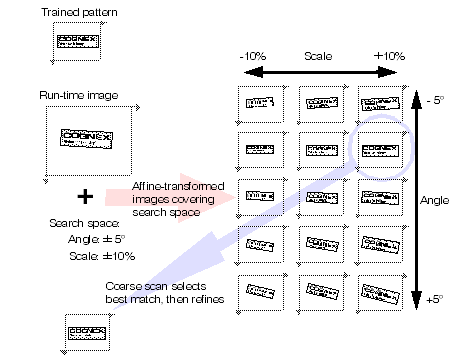
Note: If your search includes a range of angle and scale values, the processing time and memory required for the search increases with the overall size of the search space and with the size of the run-time image.
SearchMax finds the location of a pattern in a search image based on a trained pattern. In addition to returning the location of the pattern in the search image, SearchMax also indicates how closely the pattern in the search image matches trained pattern by returning a score. The score indicates how close a match exists between the trained image and the image whose location was returned. Scores range from 0.0, indicating no similarity between the pattern and the feature, to 1.0, indicating a perfect match.
The search score is equal to the normalized correlation coefficient of the pixel values in the trained pattern and the pixels in the corresponding region of the search image, as described in the section Correlation Searching.
This section contains the following subsections.
- Training Inputs
- Training Image and Mask
- Grain Limits
- Compression
- Pattern Origin
- Run Time Inputs
- Run-Time Image and Mask
- Specifying the Search Space
- Start Pose
- Thresholds & Number to Find
- Polarity
- Brightness and Contrast Thresholds
- Run Algorithm
- Pattern Instance Overlap
- Searching
- Correlation Searching
- Color Search
- Specifying a Search Space at Training Time
- Requirements for Training-Time Search Space
Like PMAlign and CNLSearch, SearchMax has a training phase and a run-time phase. The successful use of the tool depends on understanding the inputs that you supply during both phases.
At training time, you specify the following basic inputs to SearchMax:
- A training image and an optional mask
- An optional pattern origin
- Optional values for coarse and fine granularity limits
Each of these inputs is described in this section.
You must supply an image to SearchMax when you train a pattern. The training image should contain the features that you expect to search for in your run-time images. In general, the smaller the training image (as long as it includes all of the features of interest), the faster SearchMax will train and run.
If your training image contains extraneous features that might not be present on all run-time images, you can exclude these features from the trained pattern by supplying a mask. The mask image may be larger than the training image (you can specify the offset of the mask image), but it must include a pixel for every pixel in the training image.
Training image pixels for which the value of the corresponding mask image pixel is zero are treated as “don’t care” pixels and are excluded from the trained pattern; training image pixels for which the value of the corresponding mask image pixel is 255 are treated as “care” pixels and are included in the trained pattern.
SearchMax uses features of different sizes to locate similar features in run-time images. SearchMax uses large features to perform the initial coarse scan of the image, and it uses small features to precisely locate features.
For example, when SearchMax searches for a trained pattern of a diskette, it uses the large features from the diskette (such as the overall shape of the diskette and the outline of the label) to quickly locate the diskette, then it uses the smaller features (such as the letters on the label) to determine the precise location of the pattern. the following figure shows how SearchMax uses the different feature sizes.
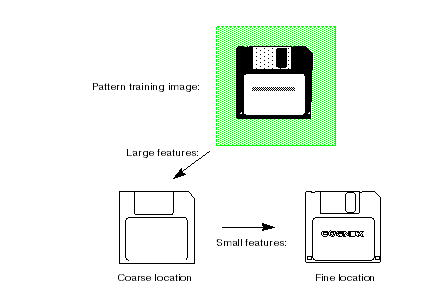
The features that SearchMax detects in an image are controlled by the granularity that it uses to analyze the image. To detect only the large features in an image, SearchMax uses a larger granularity setting. To detect the small features in an image, SearchMax uses a smaller granularity.
Granularity is expressed as the radius of interest, in pixels, within which features are detected. The preceding figure illustrates two important characteristics of pattern granularity.
- Large features such as the outline of the diskette are detected at both small and large granularity settings.
- Smaller features are present or absent from the image depending on the granularity setting.
In some cases, however, a feature might be present at a fine granularity and at a coarse granularity, but not at an intermediate granularity.
SearchMax uses a range of pattern granularities when it trains a pattern from an image; SearchMax automatically determines the optimum granularity settings when it trains a pattern. The smallest granularity used to detect features in the training image or shape description is called the fine granularity limit. The largest granularity used to detect features is called the coarse granularity limit.
You can override the grain limits that SearchMax determines, but in most cases the automatically computed limits provide good performance and accuracy.
As described in the section Correlation Searching, SearchMax locates and scores pattern instances using the normalized correlation of pixel values between pattern and image. By default, SearchMax considers the value of every pixel in both pattern and run-time image. To improve run-time execution speed, SearchMax allows you to specify compression options at training time. When you specify a compression value, SearchMax can reduce both the amount of memory required for a trained pattern and the amount of time required to compute the correlation coefficient. SearchMax lets you specify the type of compression to use and how much compression to apply.
Using compression can provide a significant speed improvement, but it may cause certain marginal pattern instances to be missed.Also, the run-time scores may be less accurate when compression is enabled. You can specify, at run time, that SearchMax use an uncompressed version of the trained pattern to compute the final score.
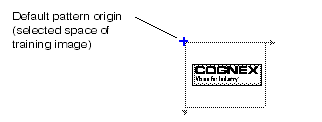
When you train a SearchMax pattern, SearchMax initializes the pattern origin to a value that you specify. When SearchMax returns the location of a pattern instance in a run-time image, it does so in terms of the pattern origin.
The pattern origin is a six-degree of freedom pose that describes the relationship between pattern features and the selected space of the training image. By default, the pattern origin is an identity transform, so pattern instances are returned as the pose of the training image selected space in the run-time image selected space. The following figure shows the default pattern origin for a trained pattern.
When you run SearchMax, it returns a pose that describes how the trained pattern maps into the found instance.
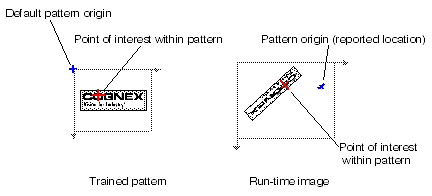
If you supply a non-default pattern origin you should keep the following points in mind:
- SearchMax will return results that describe the difference between the trained pattern after it has been transformed by the generalized pattern origin and the pattern in the run-time image.
- Any zone ranges and nominal values that you specify at run time are interpreted with respect to the transformed trained pattern.
- Supplying an origin has no effect on the speed, accuracy, or number of results produced by SearchMax.
At run time, you specify the following inputs to SearchMax:
You must supply a search image when you run the SearchMax tool. The tool searches the supplied image for the trained pattern. If the run-time image includes features at known locations that would tend to increase image confusion or tend to prevent matches, you can exclude them by supplying a mask image.
The mask image may be larger than the run-time image (you can specify the offset of the mask image), but it must include a pixel for every pixel in the run-time image. Run-time image pixels for which the value of the corresponding mask image pixel is zero are treated as don’t care pixels and are excluded from the search; run-time image pixels for which the value of the corresponding mask image pixel is 255 are treated as care pixels and are included in the search.
To search using SearchMax, you must specify the following information about the search space over which you wish to search for pattern instances.
- For each of the generalized degrees of freedom (rotation, uniform scale, x-scale, y-scale, and skew), you must either specify a nominal value or a range.
- You may specify a search region within the image, in which case only pattern instances that lie wholly within the region are returned.
- You may specify an origin boundary rectangle, in which case only pattern instances where the pattern origin lies within the specified region are returned.
If you specify both a search region and an origin boundary region, then only pattern instances that meet the requirements of both regions are returned.
You can specify an optional start pose for a SearchMax search. If you already know the coarse pose of the pattern instance of interest, specifying a start pose lets you reduce the time required for a SearchMax search.
The start pose is specified as a 6-degree of freedom transformation giving the pose of the pattern, as defined by the pattern origin, relative to the selected space of the run-time image.
If you specify a non-identity start pose, then SearchMax ignores any nominal values that you specify for the generalized degrees of freedom and simply computes the score at the specified pose.
If you specify a range for a degree of freedom and you provide a non-identity start pose, the range is relative to the start pose. For example, if the start pose specifies an angle of +45° and you specify a range of -5° to +5° degrees for the angle degree of freedom, SearchMax will search for pattern instances with angles of 40° through 50°.
If you specify a start pose, you can set the translation uncertainty using separate properties without needing to alter the start pose. The translation uncertainty is always specified in the units of the currently selected space of the run-time image.
When you perform a search using SearchMax, you specify parameters that SearchMax uses to determine whether a particular feature within the image is a valid instance of the pattern.
- The acceptance threshold The acceptance threshold is the score (between 0.0 and 1.0) that SearchMax uses to determine if a match represents a valid instance of the pattern within the search image. Matches with nonzero scores greater than or equal to the acceptance threshold are valid matches. You use the acceptance threshold to indicate to SearchMax the degree of image degradation that you expect in search images. If you expect search images to be degraded, you should specify a lower acceptance threshold.
- The minimum number of instances of the pattern you expect the search image to contain SearchMax returns the location of every instance of the pattern within the search image that has a score that exceeds the acceptance threshold, up to the number of instances you specify. If there are fewer instances of the pattern with scores above the acceptance threshold than you specify, SearchMax might return the location and score of some additional instances with scores below the acceptance threshold, although those instances will be marked as not found.
- The confusion threshold The confusion threshold is the score (between 0.0 and 1.0) that represents the highest score that a feature that is not an actual instance of the pattern will receive. You should always set the confusion threshold greater than or equal to the acceptance threshold. SearchMax treats the confusion threshold you specify as a hint about the nature of the image being searched. You should specify a high confusion threshold to indicate that the scene contains features that resemble the pattern but are not valid instances of the pattern; specify a low confusion threshold to indicate that the only features in the scene that resemble the pattern are valid instances of the pattern. You use the confusion threshold to indicate the difficulty you expect SearchMax to have discriminating between valid instances of the pattern and other features in the image. If you expect SearchMax to have difficulty discriminating which are valid instances of the pattern, you should specify a higher confusion threshold. In general, a higher confusion threshold can increase the reliability of searches at the cost of somewhat slower searching. A properly selected confusion threshold lets SearchMax provide the best balance of reliability and speed.
SearchMax evaluates the similarity of feature matches in the run-time image to the trained pattern by computing the normalized correlation coefficient of the pixel values in the two images, as described in the section Correlation Searching. This correlation value is returned as the search score. Search scores can range in value from -1.0 through +1.0. A score of +1.0 indicates a perfect match, while a score of -1.0 indicates a perfect mis-match. A score of 0.0 indicates no match. By default, SearchMax clamps search scores to the range 0.0 through 1.0. All mis-match results receive a score of 0.0.
You can specify that SearchMax ignore the polarity of search scores. In this case, negative scores are mapped to positive scores.
Note: SearchMax, polarity refers to inverting the pixel values while for PMAlign, polarity refers to the polarity of image features (dark-to-light or light-to-dark). The SearchMax tool can not find pattern instances which exhibit nonlinear intensity differences from the trained pattern, regardless of whether polarity is ignored or considered. Only PMAlign and CNLSearch (in nonlinear mode) can find such pattern instances.
SearchMax performs a basic histogram analysis of both the training image and the matched pixels in the run-time image. When you run SearchMax, you can limit search results to those with a specified brightness and contrast variation from the trained image.
The brightness variation threshold is expressed as a low and high multiplier value for the mean of the training image pixel values compared with the run-time image pixel values. The contrast variation threshold is expressed as a low and high multiplier value for the standard deviation of the trained image pixel values compared with the run-time image pixel values.
Using these thresholds can allow you to reduce the acceptance threshold without finding spurious matches.
Choose between the Standard and the High Accuracy algorithm for finding the pattern. The default is Standard and is compatible with existing VisionPro applications. The High Accuracy algorithm can produce more accurate results but can require more time to analyze the image.
Be aware that you cannot choose the High Accuracy algorithm if you choose any type of compression option or if you use a run-time image mask.
By default, when SearchMax finds multiple feature instances in the run-time image that largely overlap each other, it assumes that these instances actually represent the same features in the image. For example, if you use SearchMax to search for the part shown in the following figure with the angle degree of freedom enabled, SearchMax will locate three instances of the part at the same location but at three different angles. By default, SearchMax discards all but the strongest match and returns a single result.
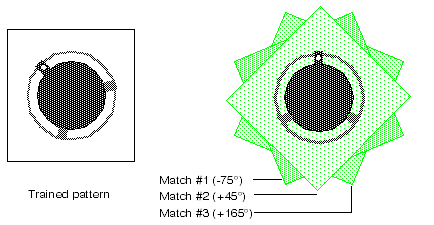
For some applications, it might be necessary or desirable to obtain a separate result for each of the matching instances shown in the preceding figure.
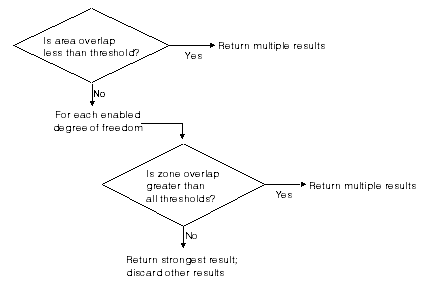
SearchMax lets you control how multiple overlapping pattern instances are handled by letting you specify an overlap threshold. You can specify an area overlap threshold (expressed as the percentage of the pattern training area that overlaps) and a separate zone overlap threshold for each enabled degree of freedom.
Note: The area overlap and zone overlap thresholds behave differently. As you increase the area overlap threshold, SearchMax requires that multiple instances overlap to a greater degree before it treats them as a single instance. As you decrease the area overlap threshold, SearchMax requires that multiple instances overlap to a lesser degree before it treats them as a single instance. As you increase a zone overlap threshold, SearchMax requires a smaller difference in the degree of freedom value between multiple instances before it treats them as a single instance. As you decrease a zone overlap threshold, SearchMax requires a greater difference in the degree of freedom value between multiple instances before it treats them as a single instance.
SearchMax uses the procedure shown in the following figure to determine whether or not to discard overlapped pattern instances.
This section describes the details of how SearchMax works at run time.
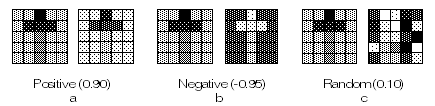
SearchMax determines the degree to which features in a run-time image are similar to the features in a training image by computing the correlation coefficient of the two sets of pixel values. The correlation coefficient is expressed as a number between -1.0 and 1.0. A correlation coefficient of 1.0 means that the pixel values in the two images are perfectly matched. A correlation coefficient of -1.0 means that the pixel values in the two images are perfectly mismatched. A correlation coefficient of 0 means that pixel values in the two images are randomly different.
The following figure shows three sets of image pairs, one pair with a positive correlation (a), one pair with a negative correlation (b), and one pair with an insignificant correlation (c).
Mathematically, the correlation coefficient r of a pattern and a corresponding portion of an image at image offset (u,v) is given by
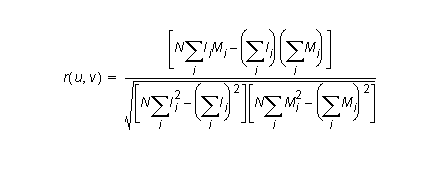
where
N is the total number of pixels. Ii is the value of the image pixel at (u+xi, v+yi). Mi is the value of the corresponding pattern pixel at the relative offset (xi, yi).The value of r is always in the range -1.0 to 1.0, inclusive. A value of 1.0 signifies a perfect match between the area of the image and the pattern. Specifically, if r = 1.0, there exist some values a and b such that for all i:
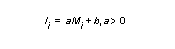
Note: If you have specified scale or rotation, the correlation is computed using the affine transformed version of the run-time image.
When you use SearchMax with color images, the tool searches all three planes of the color image simultaneously, and it computes the search score across all the pixels in all three planes.
You can alter the relative weight that the tool applies to the individual planes in computing the score.
Note: You can only search RGB color images using SearchMax. Other color spaces, such as HSI, are not supported. If you wish to use HSI images, you must convert them to RGB.
At run time, SearchMax must create a collection of affine-transformed images that covers the search space that you specify. For improved run-time execution speed, you can configure SearchMax to create these affine-transformed images at training time using the pattern training image. When you do this, SearchMax pre-trains multiple sets of pixels that correspond to the trained features at different scales and rotations.
To generate these images during training, you must specify at training time the range of scale and rotation values that your application will experience at run time. SearchMax automatically creates all of the required sets of pixels to cover the search space that you specify, as shown in the following figure.
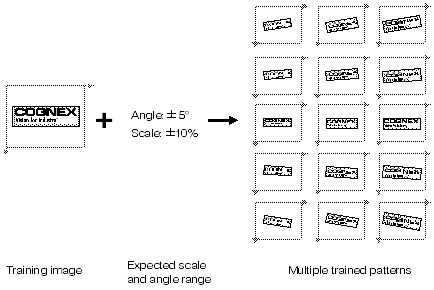
Note: When you train SearchMax using this method, it generates trained patterns that reflect the effect of the scale and rotation components of the generalized origin that you supply. Because of this, you can not change the generalized origin after training. If you wish to change the generalized origin, you must untrain the pattern, set the new generalized origin, then re-train the pattern.
If you specify a range of degrees of freedom at training time, SearchMax will not create any affine-transformed versions of the search image at run time. When you specify the degrees of freedom at training time, you must make sure that SearchMax trains all the required images to handle the expected range of run-time images.
The general requirements for specifying the training-time degrees of freedom are:
- The search space that you specify at run time for SearchMax must be entirely contained within the search space that you specified at training time. If, at run time, you specify a search space that does not meet this requirement, the tool will not run.
- The actual set of affine-transformed images created during training must contain a set of pixels that correspond to the actual pixels in the run time image. If this requirement is not met, the tool may not generate an error, but it will fail to find the pattern.
While the first requirement may seem straightforward, you need to consider the following factors when computing whether or not your training time search space will, in fact, contain your run-time search space:
- Any difference between the selected space of the training image and the selected space of the run-time image. The training search space must be expanded to reflect the difference, in any degree of freedom, between these two spaces.
- The use of a non-identity pattern origin. The training search space must be adjusted to reflect the values for scale and angle in the pattern origin.
- The use of a non-identity start pose. If you specify a start pose, then the run-time degrees of freedom are interpreted relative to that start pose.
The effect of the first and third of these factors is not known by SearchMax until you actually run the search; it is your responsibility, at training time, to compute the effect of these factors on the ultimate run-time search space and set the training time search space appropriately.
The training time search space must contain the ultimate search space as determined by the start pose, any difference between the training and run-time images’ selected spaces, any non-identity run-time start pose, and the run-time range of degrees of freedom.
This section contains the following subsections.
- Training a Pattern
- Selecting the Training Image
- Searching for the Pattern Within the Search Image
- Search Area
- Search Results
This section provides some guidelines for using SearchMax.
This section discusses in more detail the operations that SearchMax performs to train a pattern. It describes the parameters that you supply when you specify a pattern.
Once you have identified the feature within the pattern training image that you want to use for a pattern, you need to define the region of the image that you actually train as a pattern.
SearchMax only finds instances of the pattern that are entirely contained within the search image and that are no closer than two pixels to the edge of the search image. SearchMax does not find pattern instances that are only partially contained within the search image, and it does not find pattern instances that extend into a 2-pixel-wide boundary around the outside edge of the image.
Remember that SearchMax considers the entire area that you specify to be part of the pattern.
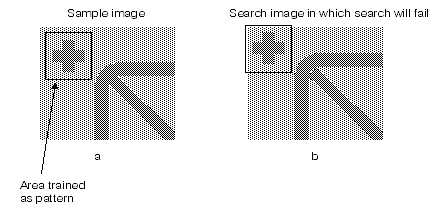
The following figure shows an image where an otherwise acceptable pattern image is trained incorrectly, resulting in search failures. The cross-shaped fiducial in the first sample image (a) is used as the pattern feature. Because the area used to define the pattern is so close to the edge of the image, when the search image is shifted (b), the pattern area falls partially outside the image and SearchMax fails to locate the pattern.
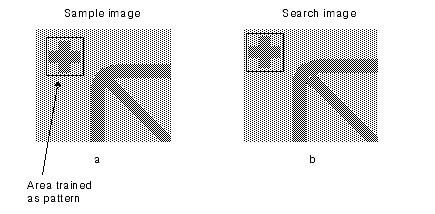
The following figure shows how the same feature in the same image can be trained correctly. By making sure that sufficient area exists between the edge of the pattern and the edge of the image, you ensure that the search will succeed even when presented with images in which the position of the feature has moved.
In some cases, specifying a larger value for the skew degree of freedom can cause a search to fail if the sheared model area overlaps the edge of the search image, even though the value is closer to the actual amount of skew in the instance. shows this effect.
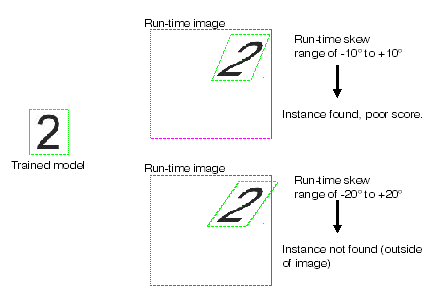
This section discusses in more detail the operations that SearchMax performs when it searches for an instance of the pattern image within the search image.
When you supply a search image to SearchMax, it searches the entire area of the image except for a 2-pixel-wide border around the outside edge of the image.
SearchMax returns a collection of information called a search result for each instance of the pattern that it finds in the search image, up to the number of instances you specify for the search. The results are returned in score order, with the highest score first.