This topic contains the following sections.
VisionPro supports the use of color cameras to acquire color images and provides a set of color vision tools to analyze the color images your vision application acquires. To acquire color images, you must use a frame grabber and a camera that supports color acquisition, such as the Cognex MVS-8504 and the Sony DCX-390 camera, or a supported IEEE 1394 DCAM-compliant camera. See the topic Color Acquisition for more information on color formats.
This section contains the following subsections.
- Color Images
- Color Spaces
- RGB Color Space
- HSI Color Space
- Color Pixels
- RGB to HSI Conversion
- Lighting and the Color of Objects
Our experience of color is a complicated combination of physical phenomena and psychological and physiological responses.
The electromagnetic spectrum encompasses all forms of radiation, from radio waves, through visible light, to gamma rays and x-rays. Within a narrow range of the electromagnetic spectrum, the human eye perceives this radiation as light. Further, the human eye can distinguish between different frequencies of visible light. We perceive different frequencies of light energy as different hues. The lower frequencies are perceived as red, the higher frequencies as blue. When we see a rainbow in the sky, or observe light diffracted through a prism, the hues of the rainbow correspond to different frequencies of light.
Human perception of the real world includes perceptions of colors that are not present in the spectrum of hues found in the rainbow. The green of an avocado, the brown of a tree trunk, and the pink of a carnation are examples of colors that are not simple hues. Our perceptions of the color of objects depends on the mixture of light energy of different frequencies that is reflected from the object into our eyes. This, in turn, depends on the frequencies of the light that illuminate the object and the tendency of the object to absorb and reflect light of different frequencies.
In many manufacturing and quality control applications, objects are sorted or classified by color, and in many cases the detection of defects requires the use of color. While these tasks may seem simple (put the red tablets in this bin, the blue tablets in the other bin), they can be complicated to solve using machine vision.
Grey-scale images reduce all of the information in a scene to an array of pixels where each pixel value corresponds to the intensity of that portion of the image. A pixel with a value of 0 is black, a pixel with a value of 255 is white, and pixels with intermediate values are various shades of grey. This reduction makes it possible to store a grey-scale image of an object using a relatively small amount of memory.
A color image, however, must store information about both the intensity and the color of the scene. In order to be useful for machine vision, a color image must be capable of storing and reproducing any of the millions of different colors that a human observer can distinguish. The straightforward relationship between intensity and pixel values in a grey-scale image does not exist for color images; there is no simple linear relationship among colors.
The first problem that must be addressed in any attempt to store color images is deciding how to encode colors numerically.
Most systems for encoding colors use three-dimensional coordinate systems, where each axis describes a separate aspect of the color. When the values from each of the axes are combined, a particular color is produced. These coordinate systems are also called color spaces.
There are many different color spaces available. VisionPro supports two of the most frequently used color spaces: RGB, which stands for Red-Green-Blue, and HSI, which stands for Hue-Saturation-Intensity.
The RGB color space closely corresponds to how color images are acquired by color video cameras and displayed by color monitors. Color video cameras separate the light from the scene into the red, green, and blue components and transmit each of these signals separately. Color video monitors accept separate red, green, and blue signals, then mix red, green, and blue light to reproduce the colors in the original scene.
The following figure illustrates how some color video cameras work:
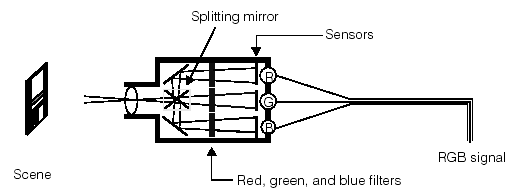
The light from the scene is focused through the lens, then split into three separate images. Three color filters are used to produce one image of only the red light from the scene, one image of only the blue light, and one image of only the green light. These three separate images are encoded and transmitted as separate analog video images using the same timing standards used for grey-scale video signals.
Note: Different video cameras use different systems for obtaining and transmitting the separate red, green, and blue images of the scene.
Color video monitors use a similar process to produce a color image from these three separate red, green, and blue images. The three images are overlaid upon each other and the resulting combination of red, green, and blue light for each pixel of the image produces the color of that pixel from the original scene.
The following figure illustrates how a color monitor produces a color image using the separate red, green, and blue signals produced by the color camera:
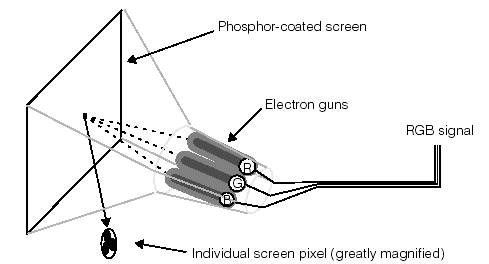
Each pixel of the video display screen is composed of a separate red, green, and blue pixel element. The video display includes a separate electron gun for red, green, and blue. Each gun is focused on the appropriate part of the pixel. As the guns receive the RGB signals from the camera (or other source), they sweep across the tube, illuminating each pixel with the specified combination of red, green, and blue. The resulting color mixture produces the correct color for each pixel.
Because of its close relationship to how color is recorded and displayed by video technology, the RGB color space is a very common way of encoding colors. One limitation of the RGB color space is that it is often difficult to relate a particular RGB value to how a color appears. For example, the color with a value of R-105, G-206, and B-102 is a pale green.
When human beings describe colors, they often do so in terms of the color’s hue (is it red, yellow, or violet), saturation (is it a pure color or is it diluted with white), and intensity (is it bright or dim). The HSI color space is based on the fact that all perceivable colors can be described in terms of these three measures.
The hue of a color corresponds to its location within the visible portion of the electromagnetic spectrum of radiation:

The conversion of a hue to a numerical value is done by creating a color wheel. A color wheel places all of the hues from the spectrum on a circle. A particular hue is specified by giving the angle at which that hue lies on the color wheel. The following figure shows a color wheel:

The saturation of a color is the degree to which the color is mixed with grey. A fully saturated color is pure. As a color becomes mixed with grey it becomes less saturated. For example, as the color red becomes less saturated it tends toward pink. The red of a fire engine is a saturated red, while the pink of a carnation is an unsaturated red. The following figure shows a range of saturation values for a single hue:

A color’s saturation is expressed as a number from 0 through 255 that indicates the amount of dilution by grey. A value of 0 for saturation indicates grey.
The intensity of a color is the amount of light, from black to white, expressed as a number from 0 through 255. A value of 0 indicates black, while a value of 255 indicates white.
The three components that make up the HSI color encoding can be visualized together as making up a space composed of two cones, as shown in the following figure:
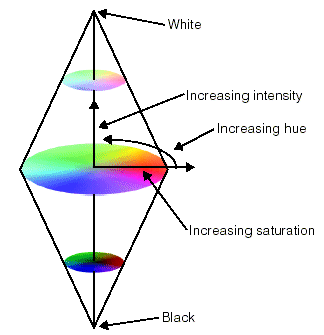
All possible colors occupy points within this volume. Completely saturated colors exist on the outside surface of the space. Shades of grey are located along the central axis of the shape; black is at the bottom vertex and white is at the top vertex.
Whether a color image is encoded as an RGB image or an HSI image, each pixel in the image must contain a separate value for each dimension in that image’s color space. For example, each pixel in an RGB image must contain a separate Red, Green, and Blue value.
VisionPro stores color images as separate image planes for each color component of the image. Each of these image planes contains all of the image pixels for a particular color component, and each plane has the same dimensions as the overall image.
In a color plane image, the image consists of a separate array of pixels for each component of the color space used by the image. In the case of an RGB image, this means separate Red, Green, and Blue image planes, as shown in the following figure:
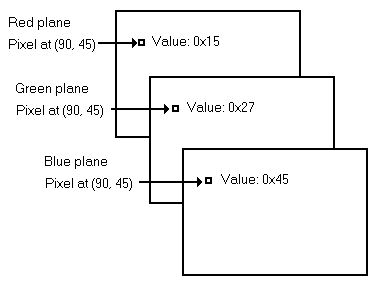
The VisionPro color vision tools generate results by working with the color planes individually. The separate values only need to be combined during the display of the color, when the individual screen pixel is charged with the appropriate amount of red, green and blue.
The VisionPro color tools can convert images between the RGB and HSI format. To perform the conversion from RGB to HSI, VisionPro generates the following intermediate values from the corresponding pixels in the red, green and blue color planes:

VisionPro then uses those values to generate the pixel values for each plane of the Hue, Saturation and Intensity color space by using the following equations:

To convert from HSI to RGB color space, VisionPro uses the inverse of the preceding functions.
Our perception of the color of an object depends on the balance of frequencies of light energy that come from that object. The balance of frequencies of light energy that come from an object depends on two factors:
For example, consider a green apple. The apple appears green to a human observer because it tends to reflect light with frequencies around the center of the spectrum. When the apple is illuminated with light that contains an even distribution of energy across the spectrum, the distribution of light frequencies reflected by the apple is like the distribution shown in the following figure:

If the distribution of light energy in the light illuminating the apple changes, the distribution of light energy reflected by the apple also changes. For example, if the light energy is reddish (it contains more long wavelength light), the light reflected by the apple is reddish, as shown in the following figure:

The distribution of frequencies in light from a light source is sometimes referred to as the white balance. If the distribution of light tends toward the lower frequencies, the light is 'warmer'. If the distribution of light tends toward the higher frequencies, the light is 'cooler'.
Different types of artificial light sources have different color balances, and the color balance for most light sources varies over time. Human beings' visual systems tend to automatically compensate for changes in the color balance of light sources. Different color camers provide different methods for adjusting the current level of white balance.