This topic contains the following sections.
The CogCalibNPointToNPointTool and CogFixtureNPointToNPointTool vision tools both use pairs of points to compute a useful 2D transformation. The two points in each pair must correspond to the same, unique, two-dimensional location on the physical object that you are using for calibration or fixturing, and you must structure your application so that the points in a pair meet this requirement. The following sections illustrate two key strategies for using the N-Point tools correctly.
The following figure shows an example calibration plate, where the physical location for the center of each dot is given:
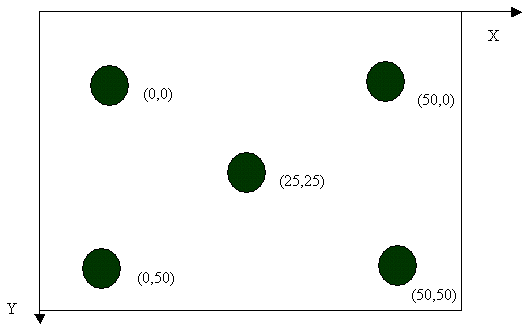
You might use a vision tool such as PatMax or Blob to find the location of each dot in the image and then pair the image location of the dot with its physical location to compute an N-Point calibration. This approach requires you to acquire a single image of the plate and then assign a correspondence between blob results and physical locations. Note, however, that a different image of the same plate may require a different correspondence. For example, the dot that was the first blob result in the first image might be the third blob result in the second image. This change would alter the pairing between blob image locations and physical locations and would require you to re-order the inputs to N-Point calibration.
A better strategy would be to use a calibration plate where the dots were different in size, or perhaps of varying shape. You could then use a tool like Blob to sort them into size-order, ensuring an unchanging correspondence between blob results and physical location.
If it is impossible to change the calibration plate than you might be able to run, for example, 5 different Blob tools, each with its own non-overlapping region of interest, to uniquely identify the image location of the five dots. If you prefer to use a single blob tool on the entire image you can write code to identify each dot using its position.
There are many different approaches that you can use to uniquely identify image features. Use an approach that is appropriate for your application to ensure the proper correspondence between image points and physical points.
A vision application might require that you fixture a square object that moves only a small amount in each successive image. You must identify points on the square that are uniquely identifiable in two dimensions. For example, a good strategy would be to use three different PatMax tools to find three corners of the square object. The corners are unique in two dimensions and can easily be identified. The corners in one image can be paired confidently with the corner positions in a second image.
You must not use a tool like a Caliper tool in an attempt to locate points on the side of the square object because the Caliper tool only searches in one dimensions. For example, refer to the following figure:
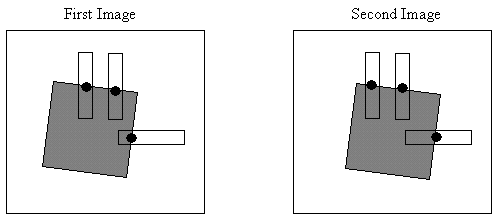
The position of the square in the second image has moved to the right and shifted down, but only one of the three Caliper tools has detected the translation. The two Caliper tools at the top of the object report the same location of the edge in each image. None of the locations reported by the three Caliper tools in the first image correspond to physical points being measured by the Caliper tools in the second image. The locations found in the two images do not correspond and cannot be used as input to an N-Point fixture tool. You must use points that are unique in both dimensions.