This topic contains the following sections.
The Blob tool works by segmenting the input image into object pixels and background pixels. The tool groups contiguous groups of object pixels into individual blobs. You can obtain information about an individual blob (such as its shape or size) and you can obtain information about the collection of blobs in an image (such as the number of blobs and how they are related topologically).
This topic shows you how to count the number of objects in a scene using the Blob tool.
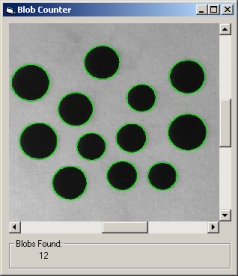
This example assumes that you have created and configured a display control named cogDisplay1 that contains the image to analyze.
In this example, the Blob tool is configured to use a hard dynamic threshold to segment the image and to look for dark objects on a light background.
private CogBlobTool coBlobTool;

private void InitializeApp()
{
    coBlobTool = new CogBlobTool();
    coBlobTool.RunParams.SegmentationParams.Mode = CogBlobSegmentationModeConstants.HardDynamicThreshold;
    coBlobTool.RunParams.SegmentationParams.Polarity = CogBlobSegmentationPolarityConstants.DarkBlobs;
}By default, the Blob tool will return information about every object in the image. In most cases, you will want to limit the size of the returned blobs to a specific range.
CogBlobMeasure coArea = new CogBlobMeasure();

// Limit to blobs 100-5000 pels in size

coArea.FilterRangeLow = 100;
coArea.FilterRangeHigh = 5000;
coArea.FilterMode = CogBlobFilterModeConstants.IncludeBlobsInRange;
coArea.Mode = CogBlobMeasureModeConstants.Filter;

// Clear existing runtime measures and add the new filter

coBlobTool.RunParams.RunTimeMeasures.Clear();
coBlobTool.RunParams.RunTimeMeasures.Add(coArea);
Once you have specified the parameters and any filtering criteria, acquire an image and run the tool using that image as input.
// Set the input image and run the blob tool

coBlobTool.InputImage = (CogImage8Grey) cogDisplay1.Image;
coBlobTool.Run();

//Display the result count

if (coBlobTool.Results != null)
    txtCount.Text = coBlobTool.Results.GetBlobs(true).Count.ToString();

// Draw a graphic 'round each blob

cogDisplay1.StaticGraphics.Clear();
foreach (CogBlobResult blob in coBlobTool.Results.GetBlobs(true))
    cogDisplay1.StaticGraphics.Add(blob.CreateResultGraphics(CogBlobResultGraphicConstants.Boundary),"");