This topic contains the following sections.
A VisionPro tool record is a flexible, hierarchical data structure that all VisionPro tools use to record and report information about their state. VisionPro tools use tool records to record their current state, and to record their results after execution. The information stored in tool records can include input, training, and output images, input regions, tool results, and tool result graphics. VisionPro tool records can also be used to record diagnostic information, including intermediate images and results.
You can find more information about records and record keys for each vision tool in About Record Keys.
You may also want to read Reading Tool Information from Tool Records, which contains an example.
VisionPro tools can create two types of records: Current Records, which contain a description of the current state of the tool, and LastRun Records, which contain information describing the state of the tool immediately after the last call to the tool's Run function.
The specific information that a record contains is determined by the value of the tool's CurrentRecordEnable, LastRunRecordEnable, and LastRunRecordDiagEnable properties. Every VisionPro tool implements these properties as part of its default interface, and every VisionPro tool defines enumerations that let you specify the specific information that is recorded in the tool's records. For example, the Blob tool's CogBlobCurrentRecordConstants, CogBlobLastRunRecordConstants, and CogBlobLastRunRecordDiagConstants constants let you determine exactly what information is recorded in records.
When you use a VisionPro tool interactively, either through QuickBuild, through a Tool Group edit control, or through the tool's tool edit control, VisionPro uses the current and last run records extensively. All of the images and graphics displayed by a tool edit control are actually contained within the current and last run records produced by that tool. The following figure shows how tools and controls use records:
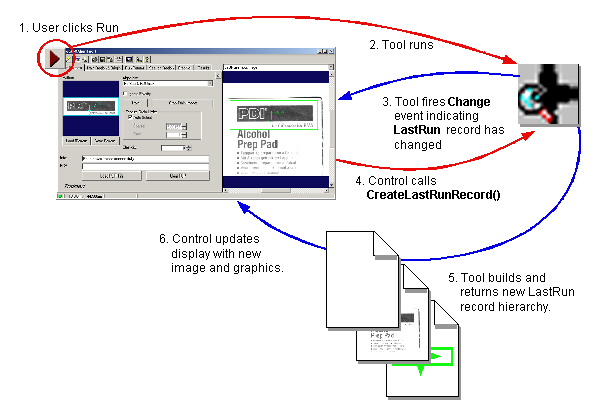
Note that the process shown above happens whenever a tool is part of a CogToolGroup even if no tool edit control is present; this allows the tool group to create and maintain its own last run records.
VisionPro tool records are only constructed when a call is made to the CreateCurrentRecord or CreateLastRunRecord function.
Whenever you are using a CogToolDisplay control (which is the control used by all VisionPro tool edit controls to display images and graphics associated with a tool), that control automatically requests the creation of new current and last run records. The CogToolDisplay's image selection menu always shows all of the images (and associated graphics) that are present in the tool's current and last run records. The CogToolDisplay control catches Changed events from the tool and automatically constructs new current and last run records whenever the tool's state changes.
With one exception, the overhead associated with the construction of tool records is not incurred until you (or a control that you are using) requests the construction of a record. If the tool you are using supports the inclusion of diagnostic information in last run records, then requesting that diagnostic information may cause the tool to take extra time when it runs to compute and store the diagnostic information used to build the record. Only information requested by calling LastRunRecordDiagEnable will cause the Run function to take extra time.
Some records have content that takes a long time to construct. For example, the boundary graphics produced by a CogBlobTool can include the boundaries of hundreds or even thousands of blobs, and the time required to generate these graphics can be substantial. In many cases, these graphics are never actually displayed. To prevent the creation of these records from slowing down a tool's execution time unnecessarily, VisionPro tools may not actually construct a record's data until it is requested with a call to Content.
The CogRecord is an object that holds the contents of the record; record key, type, and usage properties that identify the record's contents; and a collection of zero or more sub-records. The following table provides an overview of these items.
| Item | Usage |
| Content | An object that contains this record's data. |
| RecordKey | A String that identifies this record. In general, keys created by VisionPro tools are formed by taking the last part (after "Record") of the name of the enumeration value used to specify the record. For example, the record produced by the CogFitCircleLastRunRecordConstants enumeration would have a key of Circle. |
| ContentType | A System.Type value describing the type of data in this record. |
| RecordUsage | A CogRecordUsageConstants value describing the purpose for which this record was created. |
You can use the record key, type, and usage values to filter records for specific types of information.
VisionPro provides two display controls that you can use to view the contents of tool records. The CogRecordsDisplay (note the "s") control displays a tool record and all of its subrecords. To use the control, simply place it on your form, then set the control's Subject property to the top-level tool record. The control displays a drop-down list for the user to select which record to view.
The CogRecordDisplay (no "s") control displays a single tool record only. To use the control, simply place it on your form, then set the control's Record property to the top-level tool record to display.
The following code assumes that your form contains a CogRecordsDisplay named myCRsD, a CogRecordDisplay control named myCRD, and a CogBlobTool named mBlobTool.
myCRsD.Subject = mBlobTool.CreateLastRunRecord();
myCRD.Record = mBlobTool.CreateLastRunRecord().SubRecords[0];
The CogRecordsDisplay will show all of the tool's subrecords while the CogRecordDisplay only shows the first.