This topic contains the following sections.
A common use for the Caliper tool is to measure the widths of objects. This topic shows you how to configure and use the Caliper tool to measure the width of a simple object.
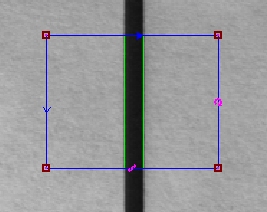
This example assumes that you have created and configured an ICogAcqFifo named coFifo and a display control named cdDisp.
To configure a tool to measure objects, you must set the EdgeMode to be CogCaliperEdgeModeConstants, and you must specify the expected edge polarity and position.
private CogCaliperTool coCal;
private CogRectangleAffine coRect;

private void InitializeApp()
{
// Allocate tools and region
coCal = new CogCaliperTool();
coRect = new CogRectangleAffine();

coRect.Interactive = true;
coRect.GraphicDOFEnable = CogRectangleAffineDOFConstants.All;
coCal.Region = coRect;

// Add the input region to the display control
cogDisplay1.InteractiveGraphics.Add(coRect,"",false);

// Set caliper to find dark-on-light
coCal.RunParams.EdgeMode = CogCaliperEdgeModeConstants.Pair;
coCal.RunParams.Edge0Polarity = CogCaliperPolarityConstants.LightToDark;
coCal.RunParams.Edge0Polarity = CogCaliperPolarityConstants.DarkToLight;

// Assume that user positions region appropriately
coCal.RunParams.Edge0Position = -coCal.Region.SideXLength / 4;
coCal.RunParams.Edge1Position = coCal.Region.SideXLength / 4;
}To return the size of an object in real-world size units, you must first calibrate your system. To do this, acquire an image of an object of a known size, then compute and store the ratio of the object's size to the distance between the two edges in pixels.
// Acquire an image and run the caliper tool. int tNum; coCal.InputImage = (CogImage8Grey)myAcqFifo.Acquire(out tNum); coCal.Run();// Compute the scaling factor. Our object is known to be 10.5 millimeters in size. if (coCal.Results != null) if (coCal.Results.Count > 0) caliperScale = 10.5 / (coCal.Results[0].Edge1.Position - coCal.Results[0].Edge0.Position);
To measure an object of unknown size, acquire an image of it, run the Caliper tool, and use the scaling factor computed in the previous step to convert the edge distance in pixels into millimeters.
' Acquire an image and run the Caliper tool int tNum; coCal.InputImage = (CogImage8Grey) myAcqFifo.Acquire(out tNum); coCal.Run();' Compute the size if (coCal.Results != null) if (coCal.Results.Count > 0) txtSize.Text = ((Double)((coCal.Results[0].Edge1.Position - coCal.Results[0].Edge0.Position) * caliperScale)).ToString();