This topic contains the following sections.
This topic describes the Histogram tool, a tool that computes histograms and histogram statistics for an input image.
A histogram is a one-dimensional function of pixel values that represents the distribution of pixel values in an image. A histogram is represented by an array of integers where each element of the array, called a bin , holds a count of the number of pixels in the window with a pixel value that equals the array index of the bin. That is, the value in bin n is the number of pixels in the window of pixel value n . The total of all bin counts in the array is equal to the number of pixels in the window.
A typical histogram is characterized by the presence of peaks , or modes , representing the pixel values found in the dominant window features. As an example, consider the binary image and its histogram shown in Figure 1. Only two bins have nonzero contents in this histogram: the pixel value of the feature and the pixel value of the background.
Figure 1. Ideal binary image and its histogram
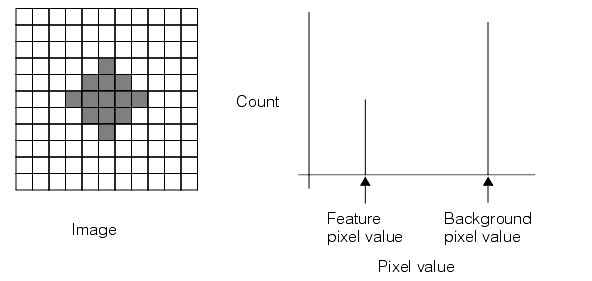
Real images, however, seldom have histograms such as this. The effects of noise from various sources (such as spatial quantization error, uneven printing, irregular lighting, and electrical noise) combine to spread out the peaks. A more realistic histogram of the scene in Figure 1 as viewed through a camera might look like Figure 2. Various features of this histogram have been marked.
Figure 2. Pixel values in an image spread out the peaks of a histogram

Each of the peaks is clearly evident in this histogram. The number of pixels representing each peak is in the same proportion as those in the previous ideal histogram, but is now spread to involve more than two pixel values. The less populated pixel values between the two principal peaks represent the edges of the feature, which are neither wholly dark nor wholly light.
The left and right tails contain outlying points, having values that might be unreliable due to noise. In order to limit the effects of this noise, you can perform mapping on your image to ignore these unreliable end points of the histogram.
The Histogram tool can compute the following statistics:
- Number of pixels
- Mean pixel value (the arithmetic average of all the pixel values)
- Median pixel value (the pixel value below which half the pixels lie)
- Modal pixel value (the most frequently occurring pixel value)
- Minimum and maximum pixel values
- Pixel value below which a supplied percentage of the pixels lie
- Standard deviation and variance of pixel values
A Histogram tool can accept 8-bit images with 256 different grey values, but can also accept images up to 16-bits and 65,536 different grey values.