Your vision application must ensure the VisionPro software is properly authorized for use through a USB security key or a Cognex frame grabber with embedded security. Your Cognex sales representative can provide you with a security device programmed with the desired licenses you need for your vision solution.
In some production environments it can be possible that multiple security devices are connected to a single computer. For example, you can install multiple grabbers depending on the number of cameras your application requires.
Be aware VisionPro cannot combine the security licenses from more than one device. If your computer supports multiple security devices, VisionPro provides a method for specifying a preferred device for license authentication.
Perform the following steps to indicate the preferred security device for your VisionPro installation:
- Open a Windows command prompt with Administrator privileges.
Use the cogtool utility to discover the serial number of the security device you want to use with your VisionPro application:
cogtool --print | more
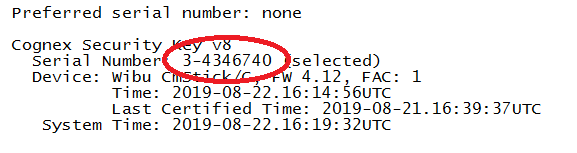
- Use the --prefer option of the cogtool utility to set the preferred security device using the serial number, as shown in this example using the serial number from the previous step:
cogtool --prefer=3-4346740
Note: Be aware that if VisionPro cannot locate your preferred security device, VisionPro behaves as if there were no security device at all.
Be aware of the following behavior is you do not specify a preferred security device in your computer:
- If there is only one security device, VisionPro uses that device.
- If there are multiple devices, VisionPro uses the device with the largest number of licenses.
- If two security devices have the same number of licenses, VisionPro uses the device with the lower serial number.