This topic contains the following sections.
Starting with VisionPro 9.9, VisionPro supports vision tools based on a Cognex software architecture with .NET assemblies that use the Cognex.Vision namespace. In addition, VisionPro continues to use traditional assemblies with the Cognex.VisionPro namespace. For ease of reference, software objects that live in the Cognex.Vision namespace will be referred to as Vision Interop objects, or VI objects.
- Starting with VisionPro 9.9, VisionPro targets .NET Framework 4.8.
- If your application uses CogToolBlock or CogToolGroup, you have new run time dependencies. The data binding mechanism used to link tool terminals has been enhanced to support VI data types. See the following section on Applications that Use VI Objects for specific steps that you must take.
VisionPro incorporates Edge Learning tools from the VI architecture by wrapping them with a traditional VisionPro tool layer. For example, the CogClassifyTool is a front-end for the VI tool named Cognex.Vision.ViDiEL.ClassifyTool. The tool behaves like a traditional VisionPro tool, but is powered by the corresponding VI tool. It can be used in QuickBuild, inside a tool block or tool group, just like any other VisionPro tool. The VisionPro tool forwards its input image to the VI tool and (sometimes) returns results after the VI tool is run, as shown in the following simplified block diagram. The VI results will not be copied back to the VisionPro tool if they consist of standard .NET types (like, Integer, String, Double, etc.), but they will be copied back if they represent a Cognex.VisionPro type (for example, a CogImage8Grey).
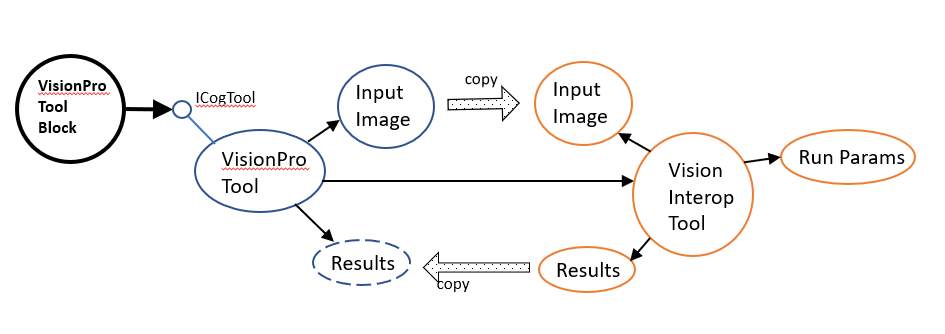
VisionPro supports the following VI classes:
- CogClassifyTool
- CogSegmentTool
- CogSmartLine
You will typically create a new-style VisionPro tool using QuickBuild, and configure that tool using its GUI edit control. The tool will be run as part of the tool block that contains it. You can, however, access the VI objects directly from C# code. This will be discussed in greater detail below.
You can access VI objects programmatically using C# and Visual Studio or through C# and VisionPro scripting.
In either environment you will need to reference the appropriate assemblies. To work with the VI component wrapped by a VisionPro ViDiEL tool, you will need to reference some or all of the following assemblies:
| Assembly Name | Reference Location | Comment |
|---|---|---|
| Cognex.VisionPro.ViDiEL.dll | c:\Program Files\Cognex\VisionPro\ReferencedAssemblies | Contains CogClassifyTool, CogSegmentTool, and related classes. |
| Cognex.VisionPro.VisionInterop.dll | c:\Program Files\Cognex\VisionPro\ReferencedAssemblies | Used by all VI tools. Provides utility methods for converting between VisionPro class objects and their equivalent VI class objects, such a CogImage8Grey to Image8Grey. |
| Cognex.Vision.ViDiEL.Classify.Net.dll | c:\Program Files\Cognex\VisionPro\bin | Required to use the CogClassifyTool. |
| Cognex.Vision.ViDiEL.Segment.Net.dll | c:\Program Files\Cognex\VisionPro\bin | Required to use the CogSmartLineTool and CogSegmentTool |
| Cognex.VisionPro.SmartLine.dll | c:\Program Files\Cognex\VisionPro\bin | Contains CogSmartLineTool and related classes |
| Cognex.Vision.SmartLine.Net.dll | c:\Program Files\Cognex\VisionPro\bin | Required to use the CogSmartLineTool |
| Cognex.Vision.LineMax.Net.dll | c:\Program Files\Cognex\VisionPro\bin | Required to use the CogSmartLineTool |
| Cognex.Vision.ElCore.Net.dll | c:\Program Files\Cognex\VisionPro\bin | Used by all VI Tools |
| Cognex.Vision.Core.Net.dll | c:\Program Files\Cognex\VisionPro\bin | Used by all VI tools. |
| Cognex.Rbbt.Net.dll | c:\Program Files\Cognex\VisionPro\bin | Used by all VI tools. |
netstandard.dll | Provided by Microsoft to facilitate interaction with mscorlib.dll. | |
| Cognex.Vision.Startup.Net.dll | c:\Program Files\Cognex\VisionPro\bin | Only required if you are working with Visual Studio. Not required for scripts. |
The following steps are needed to resolve dll dependencies that are not in the GAC. The steps will (a) create a symbolic link to the location of the dll dependencies, and (b) update the app.config file to use this location. Note that the mklink command requires Admin rights, thus you will need to launch Visual Studio as an Administrator.
Add the following postBuildEvent step to the applications Visual Studio project file:
cd $(TargetDir)
if exist VisionProDependencies\ (rmdir VisionProDependencies)
mklink /D VisionProDependencies "$(VPRO_ROOT)\bin"
Add the following to the application's App.config file:
<configuration>
  <runtime>
    <assemblyBinding xmlns="urn:schemas-microsoft-com:asm.v1">
      <probing privatePath="VisionProDependencies"/>
    </assemblyBinding>
  </runtime>
</configuration>
If you are using any VI tool you need to call the Initialize and Shutdown methods as described below:
- At the start of your application call the VI function Cognex.Vision.Startup.Initialize(Cognex.Vision.Startup.ProductKey.VProX).
- At the end of your application call the VI function Cognex.Vision.Startup.Shutdown().
- Note that even if Initialize is called again after Shutdown has been called, tools will no longer work properly. Thus make sure Shutdown is only ever called at the end of the application.
- When working with VI tools in a .NET application you should work with those tools in the Cognex.Vision namespace. This will give direct access to the VI tool without using the Cognex.VisionPro wrapper class which is designed primarily for QuickBuild integration.
For all references dlls, change the copy local flag to false:
- Click on each referenced dll
- Look in the property window
- Locate the copy local
- Set it to false
When writing script you can access VI properties directly. For example, you can set the "Enabled" property of the VI ClassifyTool using C# script code like this:
((CogClassifyTool)toolGroup.Tools["CogClassifyTool1"]).VisionInteropTool.Enabled = true;
- There is no need to call either Cognex.Vision.Startup.Initialize(Cognex.Vision.Startup.ProductKey.VProX) or Cognex.Vision.Startup.Shutdown() in your VisionPro script code. This is done automatically within QuickBuild.
To make programmatic use of VI classes with VisionPro easier, a set of conversion functions is provided. In the new Cognex.VisionPro.VisionInterop assembly is a new class named CogCoreConverters. This class provides numerous static methods for converting between VI classes and their VisionPro counterparts. See, for example:
- Image8Grey CogCoreConverters.MakeImage8Grey(CogImage8Grey image) // convert from VisionPro to VI
- CogImage8Grey CogCoreConverters.MakeCogImage8Grey(Image8Grey image) // convert from VI to VisionPro
VisionPro provides reusable WinForms based edit control classes for the Edge Learning tools: CogClassifyEditV2, CogSegmentEditV2, and CogSmartLineEditV2. These edit controls can be used in an application in the same way as other VisionPro Edit Control classes. However, these edit controls are dependent on VI UI assemblies that are WPF based, and require additional steps to make use of in an application. The following table lists the relationship between the classes for each tool.
| VPro Tool | WinForms Edit Control | Assembly Reference | VI Tool | WPF Edit Control | WPF UI Assembly | Comment |
|---|---|---|---|---|---|---|
| CogClassifyTool | CogClassifyEditV2 | Cognex\VisionPro\bin\Cognex.VisionPro.ViDiEL.Controls | Cognex.Vision.ViDiEL.ClassifyTool | Cognex.VisionProUI.ViDiEL.Classify.Controls.ClassifyEdit | Cognex\VisionPro\bin\Cognex.VisionProUI.ViDiELClassify.Controls.dll | . |
| CogSegmentTool | CogSegmentEditV2 | Cognex\VisionPro\bin\Cognex.VisionPro.ViDiEL.Controls | Cognex.Vision.ViDiEL.SegmentTool | Cognex.VisionProUI.ViDiEL.Segment.Controls.SegmentEdit | Cognex\VisionPro\bin\Cognex.VisionProUI.ViDiELSegment.Controls.dll | . |
| CogSmartLineTool | CogSmartLineEditV2 | Cognex\VisionPro\bin\Cognex.VisionPro.SmartLine.Controls | Cognex.Vision.SmartLine.SmartLineTool | Cognex.VisionProUI.SmartLine.Controls.SmartLineEdit | Cognex\VisionPro\bin\Cognex.VisionProUI.SmartLine.Controls.dll | . |
| (All) | . | . | . | . | Cognex\VisionPro\bin\Cognex.VisionProUI.Controls.dll | Support assembly |
| (All) | . | . | . | . | Cognex\VisionPro\bin\Cognex.VisionProUI.Implementation.dll | Support assembly |
Similar to the VI tool assemblies, none of the assemblies listed in this table are installed to the .NET Global Assembly Cache (GAC). They must be referenced from the Cognex\VisionPro\bin directory.
The edit controls are only available in x64, so they are not available in the toolbox in Visual Studio Designer. Instead they must be added to an application programmatically. See the sample code for CogClassifyTool and CogSegmentTool for details.
Because of the new run time dependencies for VI-based classes (such as CogClassifyTool) or classes that potentially could load/use VI-based classes such as CogToolBlock, CogToolGroup) you will at a minimum need the DLL dependency steps listed in the topic Using VisionPro with Microsoft Visual Studio. This requires:
- An edit to the application's app.config file,
- A new postBuildEvent command, and
- Calls to the Initialize and Shutdown methods.
- All referenced assemblies should set the Copy Local to No.
See the topic Deploying Your VisionPro Application for details on deploying your finished vision application to other systems.
Note that an <applicationName>.exe.config file will be generated by Visual Studio and this needs to be deployed along with your built executable. This tells the application where to look for the non GAC'd DLL dependencies, but it also needs the symlink to exist. A batch file called VisionProDependencyHelper.bat can be found in the VisionPro bin folder to create the links for you. The bat file needs to be executed in the folder where your application executable resides and needs to be run as Administrator due to the mklink command.
ViDiEL wrapper classes such as Cognex.VisionPro.ViDiEL.CogClassifyTool are not guaranteed to reflect every change to an attached VI tool like the CogClassifyTool. This is another reason to use the VI tool directly where possible in .NET applications.