Runtime
Runtime stands for inference-only, which means that the tools can process images, but the tools cannot be modified or retrained. The processing of tools is the minimum functionality required to be able to run the ViDi Tools in a deployed production environment.
| Pros | Cons |
|---|---|
| Easier to integrate | Needs a running ViDi Suite license to be able to retrain the tools |
| Parameters are frozen, the application operator cannot modify the tools | More complicated architecture |
Applications for runtime deployment are as follows:
- The application operator does not need to retrain the tools.
- Applications where strict control of the application recipes has to be assured (i.e. medical and pharmaceutical applications).
- Applications that require tool processing be run on low power or embedded platforms, and training is done on other platforms.
- When multiple lines use the same application recipes.
- To perform demonstrations, quick-to-market solutions, and proof of concept applications.
| Programming Language | Methods |
|---|---|
| .Net | namespace Runtime |
| C | vidi_runtime_* |
Examples
| Programming Language | Examples |
|---|---|
| .Net | Example.Runtime.GUI |
| Example.Runtime.Console.MultiGPU | |
| C | Example.Cpp.Runtime |
| Example.Cpp.Runtime.MultiGPU | |
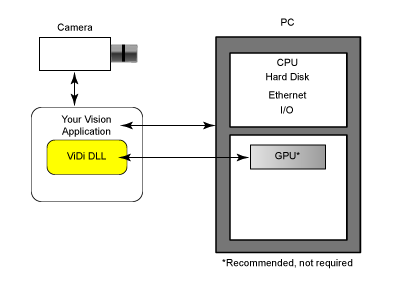
The ViDi DLL is embedded in the application, possibly through a 3rd party application.
Your vision application is responsible for the following:
- Load a remote workspace into the ViDi DLL
- Acquire images
- Transmit the images to the ViDi DLL
- Interpret the results and act accordingly
- Give feedback to the user
The ViDi DLL is responsible for the following:
- Handles the GPU
- Retrieves an image (through memory or hard drive) and returns an XML string
A .NET wrapper provides a UI element that can be used to display the results.
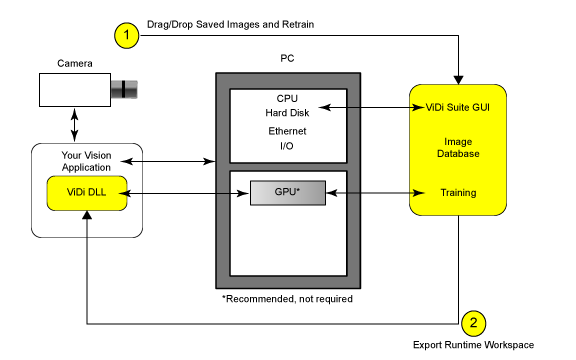
Since the ViDi DLL does not have integrated training capabilities, you have to use the ViDi GUI to train a new recipe. This is done in the following three, separate steps:
- Acquire images.
- Transmit them to the ViDi GUI, either through the DLL, using the add to database method, or by manually dragging and dropping them into the ViDi GUI.
- Export the runtime workspace and load it inside the DLL. This can be done manually or using get workspace from server method in the DLL.
Your vision application is responsible for the following:
- Acquire images.
- Transmit the images to the ViDi GUI through the DLL using either the add to database method, or writing them to disk.
- Load the new runtime workspace when training is completed.
To train the system, you do the following:
- Retrieve the images from hard drive and drops them into the ViDi GUI.
- Train the tools.
- Export a runtime workspace.