ViDi Suite Startup Options
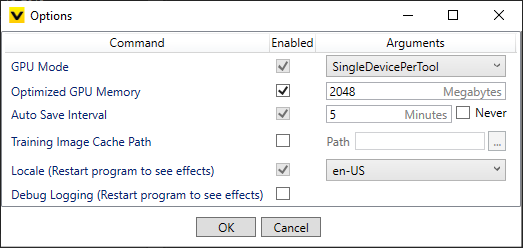
When launching the ViDi Suite GUI, there are several options that you can use to control the GPU Mode, which GPU device to use and the allocation of GPU memory, in addition to project settings.
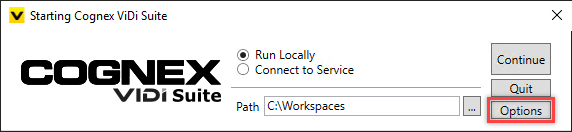
At the Starting Cognex ViDi Suite screen, press the Options button.
| Command | Settings | ||||||
|---|---|---|---|---|---|---|---|
|
GPU Mode |
Specifies the GPU mode to be used by the application.
|
||||||
|
Optimized GPU Memory |
Specifies the size of the pre-allocated optimized memory buffer. This setting is activated by default, with the default size of 2GB. |
||||||
|
Auto Save Interval |
Specifies how often a workspace will be auto-saved. The default is every 5 minutes. |
||||||
|
Training Image Cache Path |
Specifies a cache location for training images. This is useful if the images in a stream are in non-raster format (e.g. JPG, PNG, or GIF), since they must be converted to a raster (BMP) format for training. By default, this conversion happens multiple times for each image. By enabling the Training Image Cache Path, the conversion is only performed once and the converted images are stored in a local cache directory. The cache directory should be local, and preferably on a Solid-State Drive (SSD). This option can also speed up training in cases where the workspace is stored on a slower drive or a remote storage device. |
||||||
|
Locale |
Specifies the language to use throughout the ViDi Suite GUI. |
||||||
|
Debug Logging |
Specifies whether or not debug logs should be activated for the project. |