Executing DMCC Commands in TIA Portal
Refer to sample program “Cognex-Dataman” for the complete example program. For information on how to install it, see section Using SoftEvents.
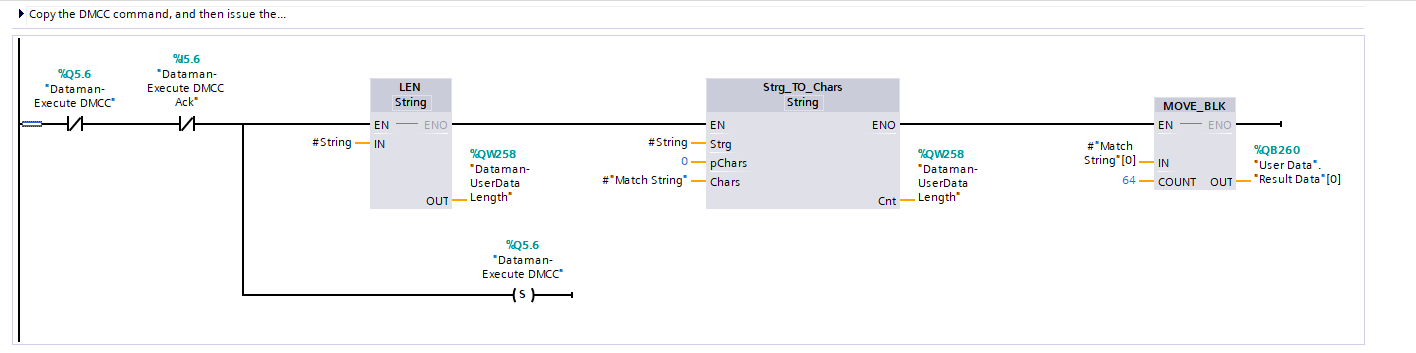
“Execute DMCC” is a SoftEvent which requires the added step of loading the User Data module with the desired DMCC command string before invoking the event. Note that the SoftEvent mechanism does not provide a means of returning DMCC response data (other than a failure indication). So this mechanism cannot be used for DMCC “||>GET…” commands.
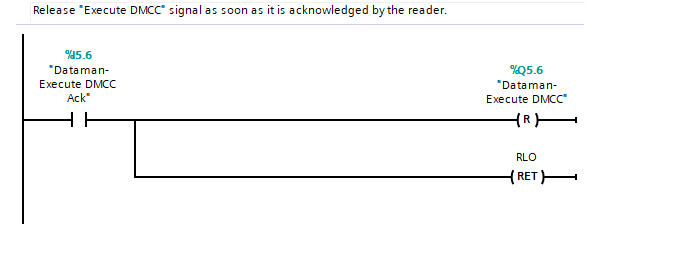
The process of executing a DMCC command is the same for all other SoftEvents (see example above) except the step of invoking the SoftEvent also includes copying the command string to the User Data Module. In this example the command string is exists in a Data Block. This example can be expanded to utilize a Data Block with an array of command strings that the copy function can reference by an index value. This allows the user to pre-define all DMCC commands that are required by the application and invoke them by index.