Cloud License Configuration
To access all Edge Learning Edge Learning is an AI-based technology used for inspections and other judgement-based tasks, to help improve quality control and optimize efficiency. The training also happens on the vision system without any external graphical accelerator. tools for the In-Sight Spreadsheet Emulator, you must import a Cloud Credential File into CodeMeter. CodeMeter is the security software installed with In-Sight Spreadsheet. The Cloud Credential File provides the required Edge Learning feature keys by authorizing a connection to a cloud dongle.
For more information about Wibu Systems licenses, see Frequently Asked Questions - Wibu-Systems.
Importing the Cloud License Credential File
To import the credential file:
-
Go to the In-Sight Spreadsheet license support site: https://support.cognex.com/en/help-articles/in-sight-vision-suite.
-
Log in to your MyCognex account.
-
Click Download Credential File.
-
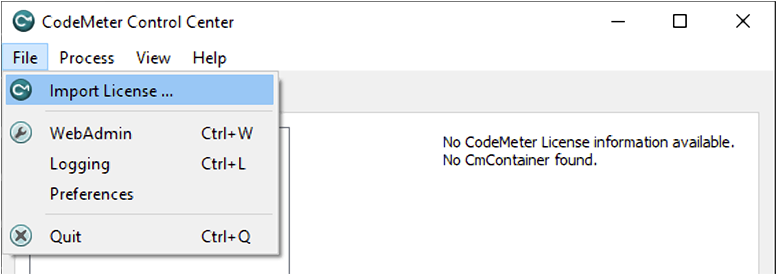
Open CodeMeter Control Center.
-
Select Import License.
-
Select the downloaded credential file.
-
Click Import.
Activating the Delete Button
Adding the Cloud License multiple times can cause issues. To remove Cloud Licenses, activate the Delete button in CodeMeter Control Center by editing the registry. This involves deleting any CmActLicense licenses.
To activate the Delete button:
-
Open the registry editor.
-
Create a new string at the following location:
HKEY_CURRENT_USER/SOFTWARE/WIBU-SYSTEMS/CodeMeterCC
Name the string AllowCmActDelete and set its value to 1.
-
Restart CodeMeter Control Center or restart your computer. The Delete button appears.
To deactivate the button, set AllowCmActDelete to 0 or delete the string entry.