Example for Changing a Job by Job ID
The following image shows an example PLC logic for changing a job by Job ID, in this case specifically a Rockwell ControlLogix PLC:
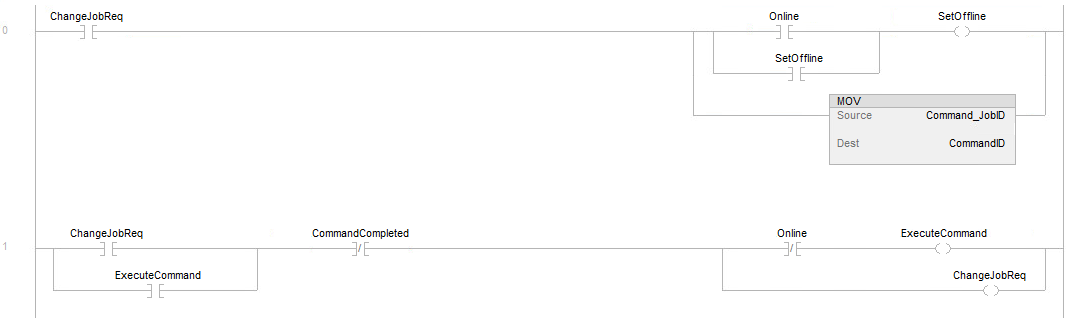
The signals used are the following:
| Signal Name | Vision System Defined Signal or Tag | PLC User Defined Tag | Notes |
|---|---|---|---|
| ChangeJobReq | - | Yes | Internal memory bit is set to 1 to initiate job change process. |
| Online | Yes | - | State of the vision system, run (online) or program (offline). |
| SetOffline | Yes | - | This bit is takes the vision system out of run mode into an offline state. |
| CommandID | Yes | - | This holds the job ID of the job to change to and is sent to the vision system. |
| Command_JobID | - | Yes | This is an internal PLC tag holding the Job ID to be changed. |
| CommandCompleted | Yes | - | This bit signals that the job load is completed (successful or failed). |
| ExecuteCommand | Yes | - | This bit gets set to 1 in the PLC and sent to the vision system to start the job change process in the vision system. |
When the ChangeJobReq bit is set to 1 in rung 0, and the vision system is in the online state the top branch sets the vision system into the offline state and it stays offline until the ChangeJobReq bit is cleared to 0. If the vision system is already offline that piece of logic does not run.
In the second branch the MOV instruction is for moving the internal value of Command_ByJobID tag into the CommandID tag to be written to the vision system.
In rung 1, the ExecuteCommand bit gets set to 1 since the vision system is offline and CommandCompleted is still cleared to 0. This logic keeps both ExecuteCommand and ChangeJobReq bits set to 1 until the CommandComplete bit is set to 1. Once the job is changed and the vision system sets the CommandComplete bit to 1, the ExecuteCommand and ChangeJobReq bits are cleared to 0. Once the ChangeJobReq bit is cleared to 0, the vision system gets set back into the online state in rung 0 and start executing the newly loaded job.