Job Change from the PLC
The following image shows the rungs for changing the job from the PLC:
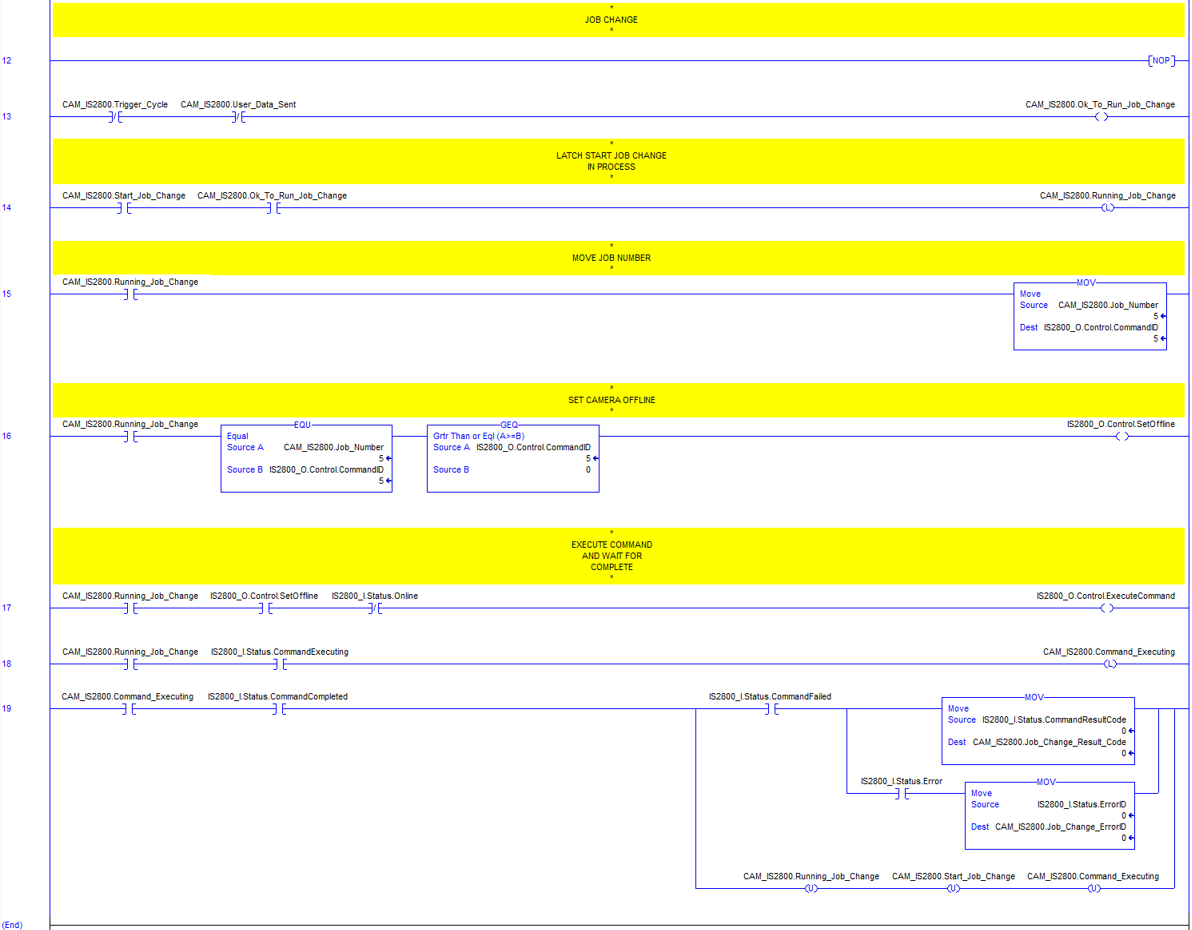
Rungs 12 - 19: encapsulate the logic to change the job by ID of the vision system from the PLC.
Rung 13: checks the states of the CAM_IS2800.Trigger_Cycle and CAM_IS2800.User_Data_Sent bits and if they are cleared to 0 (not running) and sets the CAM_IS2800.Ok_To_Run_Job_Change bit to 1 signifying it is in a job change ready state.
Rung 14: is where the you manually set the CAM_IS2800.Start_Job_Change bit to 1 to start the job change process if the CAM_IS2800.Ok_To_Run_Job_Change bit is also set 1 (rung 13). The CAM_IS2800.Running_Job_Change bit is latched when both bits are set to 1.
Rung 15: uses the CAM_IS2800.Running_Job_Change bit state (when set to 1) to move the CAM_IS2800.Job_Number into the CommandID to be sent to the vision system. The CAM_IS2800.Job_Number value is set manually to an existing job with a matching prefixed ID that exists in flash on the vision system.
Rung 16: checks that the CAM_IS2800.Running_Job_Change bit is set to 1 and conditions are met and then sets the vision system offline if they are met. CAM_IS2800.Running_Job_Change bit must be set to 1, the CAM_IS2800.Job_Number must be equal to the CommandID and the CommandID must be greater than or equal to 0 to set the vision system offline.
Rung 17: checks that the vision system is offline before the CommandExecute bit is set to 1. The CAM_IS2800.Running_Job_Change bit must be set to 1, the SetOffline bit must be set to 1 and the Online status bit from the vision system must be cleared to 0 in order for the ExecuteCommand bit to be set to start the job change process.
Rung 18: latches the internal tag CAM_IS2800.Command_Executing bit indicating the job change is executing in the vision system. In order to latch CAM_IS2800.Command_Executing to 1 the CAM_IS2800.Running_Job_Change bit must be set to 1 and the CommandExecuting bit of the vision system must be set to 1.
Rung 19: checks that the job change was successful or not. The internal status bits are unlatched to 0 clearing the logic above to its initial state ready for the next job change. The CAM_IS2800.Command_Executing bit and CommandCompleted bits need to be set to 1 to unlatch the bits. If the CommandFailed bit is also set (meaning the job change failed) then a copy of the CommandResultCode is moved into the internal tag CAM_IS2800.Job_Change_Result_Code. The Error status bit may also be set to 1 and if it is a copy of the ErrorID is moved into CAM_IS2800.Job_Change_ErrorID.