Scanning and Processing Time
After the vision system finishes a scan, it sends the scanned point cloud to the Spreadsheet for processing. While the transfer is in progress, the vision system can already start a second scan, which can run while the software is processing the first point cloud. So, the vision system can scan a second point cloud while the first point cloud is still under inspection.
To avoid dropping point clouds in case of multiple consecutive acquisitions, ensure that the inspection time is smaller than the time between the acquisitions. You can use the following Spreadsheet functions to help with timing:
-
GetAllTime(A0):
Returns the time from when the software receives the first scan line until the processing is complete. -
GetScanTime(A0):
Returns the time it takes for the vision system to scan a part, as measured by the hardware. -
GetTime(A0):
Returns the time from when the software receives the first scan line until the point cloud is fully available for processing.Note: Usually a short delay occurs between the start of GetTime(A0) and the start of GetScanTime(A0) because it takes some time for the software to receive the first scan line. Also, GetScanTime(A0) stops when the vision system stops scanning but GetTime(A0) includes the short time after the scanning used for preparing the point cloud for processing.
The status of the vision system (online or offline) affects the acquisition time, or GetTime(A0). When the vision system is online, transferring a scan to the software can take about 5–15 ms. When the vision system is offline, it can take about 100 ms to start processing. GetTime(A0) takes some extra time while offline, because the system performs some additional steps to allow the user to be able to modify filter settings after the acquisition.
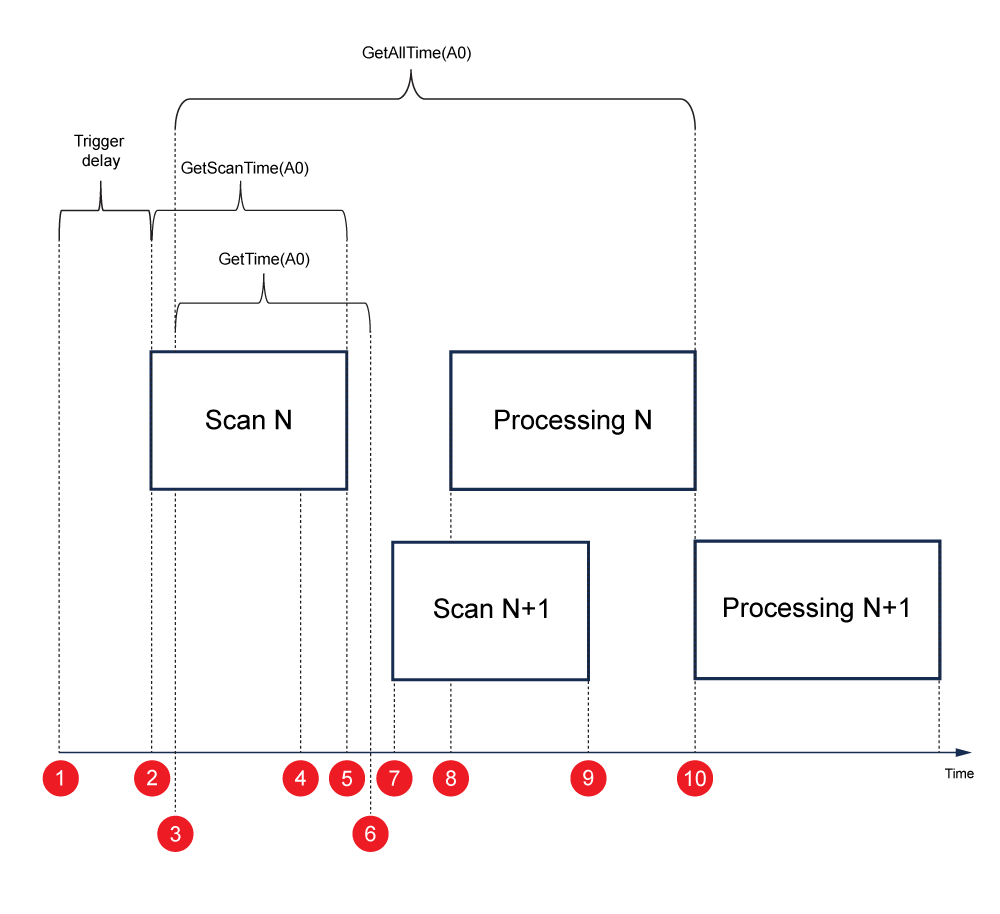
The figure below shows a timeline where the online vision system and the software go through the following steps:
|
|
-
GetAllTime(A0) shows the time between step 3 and 10.
-
GetScanTime(0) shows the time between steps 2 and 5.
-
GetTime(A0) shows the time between steps 3 and 6.
The time shown in the bottom right of the Spreadsheet is GetTime(A) and the processing time added together without the gap in between.