Profile Settings
The Profile tab of the Acquisition Acquisition is the process or result of the vision system acquiring a new image. panel allows you to configure the following profile settings:
| Parameter | Description |
|---|---|
| Exposure (ms) |
Sets the exposure time for every profile acquisition (in ms), which is the time that the imager of the vision system uses to acquire each raw image to find a laser profile. The value range is between 0.011 – 25, and the default value is 0.1. Tip:
|
| HDR Low Exposure [ms] |
The HDR Low Exposure [ms] checkbox enables a slider that allows you to configure an additional HDR exposure (in ms) lower than the regular Exposure setting. If the value of this slider is set higher than the Exposure slider or the HDR High Exposure slider (if enabled), they will be automatically adjusted to a higher value. The HDR Low and High Exposure sliders allow you to configure multiple exposures to generate peak data if the target surface has varying reflectance, and using only the Exposure setting results in under- or oversaturated areas. Enabling both HDR Low and High Exposure lets you acquire image data with three different exposure settings. |
| HDR High Exposure (ms) |
The HDR High Exposure [ms] checkbox enables a slider that allows you to configure an additional HDR exposure (in ms) higher than the regular Exposure setting. If the value of this slider is set lower than the Exposure slider or the HDR Low Exposure slider (if enabled), they will be automatically adjusted to a lower value. The HDR Low and High Exposure sliders allow you to configure multiple exposures to generate peak data if the target surface has varying reflectance, and using only the Exposure setting results in under- or oversaturated areas. Enabling both HDR Low and High Exposure lets you acquire image data with three different exposure settings. Note: The acquisition rate (indicated with Max Profile Rate) is affected by the number of exposures and their configured values as well. Therefore, enable HDR only if the results of a single exposure are insufficient.
|
| Detection Zone |
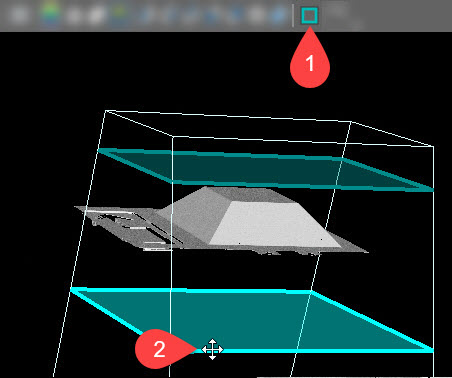
Sets the lower and upper bounds for the measurement range of the vision system (in mm) in which shapes and surfaces are detected, and image data is generated. Use the sliders to manually adjust the size, or enter a specific value. The Z min value (specifying the lower bound of the working section) cannot be higher than the Z max value, and likewise, the Z max value (specifying the upper bound of the working section) cannot be lower than the Z min value. Tip:
|
| Binning | Enables 2x2 binning that treats 2x2 pixel data as one pixel on the raw image. If this setting is enabled, it halves the resolution of the acquired profiles, resulting in a coarser point cloud, but in faster Exposure values and a higher Max Profile Rate. |
| Speckle Free Super Resolution |
Enables resolution enhancement on the X-axis for 3D points that are located around edges, providing better point cloud resolution in the affected areas. This setting only affects the resolution on the X-axis, and does not cause any reduction in the profile rate. The profile view displays an intersecting + indicator over the detected laser line for each pixel, indicating the peak position:
|
| Profile Filter Settings | |
| Median Filter |
Enables a median filter that replaces existing data point values with their median, calculated within a pre-defined window around the data point. The effects of the filter are immediately visible in the preview display. The median filter has the following options:
|
| Peak Width Threshold |
When enabled, it specifies an upper width threshold (in pixels) for laser line detection. As such, this setting can reduce the chance of detecting false peaks by removing spikes that are commonly characterized by wide laser lines due to multiple reflections. The value range is 1 – 100, and the default value is 5. Note: Peak data generated out of a laser line with a width higher than the specified value is filtered out. All other peak data is kept.
|
| Advanced Settings | |
| Selected Peak |
Defines how the vision system selects the peak data for height calculation:
Tip:
Set the Top or Bottom settings to reduce possible false peaks if you are sure that the nearest or farthest peak in the intensity image column is the correct surface to use. This is useful if the profile contains strong but false peaks. For example, if you are measuring the height of a semi-transparent cover on top of an opaque object, the acquisition would contain a weak peak from the cover and a stronger peak from the object beneath the cover. However, since you want to measure the cover, and not the object under it, you must use the Top setting. |
| Sensitivity |
Sets the laser detection sensitivity, that is a lower threshold for laser line intensity detection. The value range is 0 – 1, and the default value is 0.95. Tip:
|
 (Configure the Detection Zone) button to toggle showing the working space (1) of the